Prompt examples: ready-to-use templates for work and marketing
17 İyul 2026·Updated: ·⏱ ≈11 min·👁 821 views
Contents
- 📋 How to use these prompt examples
- ✍️ Prompt examples for writing and communication
- 📊 Data and analysis templates
- 🎨 Content and marketing templates
- 📌 How does a template work in practice?
- 🔍 Research templates
- 🧠 Thinking and decision-making templates
- 🧩 How to combine templates
- 🚫 "Templates" that do not work
- 🛠️ How to create your own template
- ❓ Frequently asked questions
- Conclusion
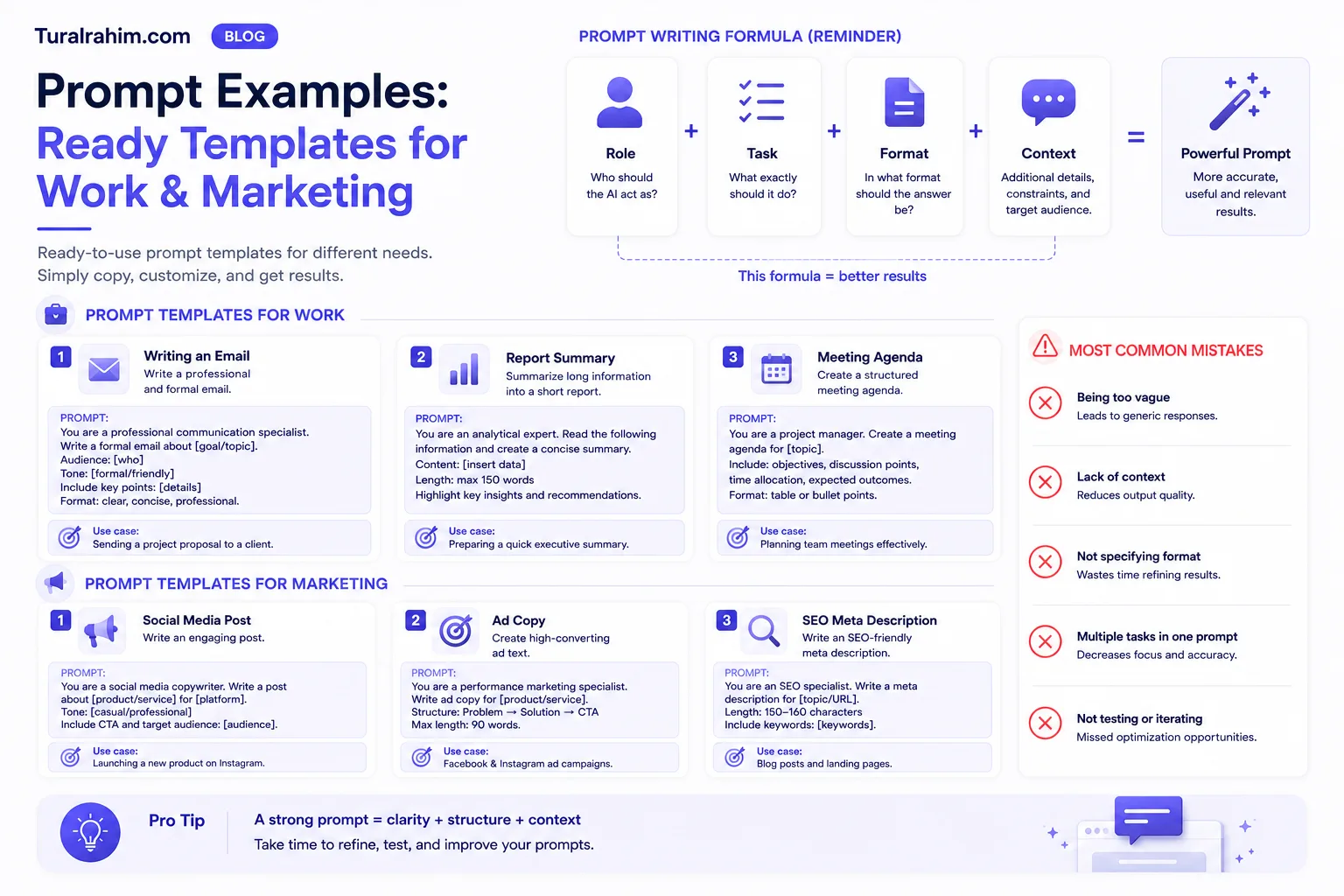
This article includes prompt templates you can copy and use straight away for business correspondence, data analysis, content, research and decision-making. Each template contains placeholders in square brackets: [like this]. Replace them with your own information and leave the rest as it is. These ready-to-use prompts help you get started with business correspondence, data analysis and content tasks simply by adding your details.
A word of caution: blindly pasting a template will not get you far. The template is a framework, and your context brings it to life. I will show you how below.
To understand why these templates are structured this way, start here: What is a prompt? The 3C rule. For a broader overview, read: 🧐 What is artificial intelligence (AI)?
📋 How to use these prompt examples
Three simple rules:
Fill in the placeholders. Replace "[your industry]" with "furniture retail". If you submit the prompt without filling it in, AI may guess the missing information and get it wrong.
Add context. A general-purpose template cannot reflect the specifics of your business. Add a sentence or two at the end: who your customers are, what did not work last time and what constraints you face.
Treat the first response as a starting point. The template startsthe conversation; it does not finish it.
The golden rule: Even a good template can produce a generic response without your context. What sets you apart from your competitors is the information you add to the template.
✍️ Prompt examples for writing and communication
1. Turn meeting notes into an action plan
"You are an experienced project manager. Prepare a report based on the meeting notes I have attached. Include these sections: decisions made, actions to take (who, what, when) and unresolved questions. Present the actions as bullet points rather than a table."
When to use it: After a long meeting, while everyone still remembers what they agreed.
2. Tailor the same update to different people
"The attached document is about [project name]. I need to share this update with two people: [first person and their priorities, e.g. finance director, interested in budget and revenue] and [second person and their priorities]. First consider what each person will focus on, then write a separate short email for each."
Why it works: You ask AI to consider the audiencebefore writing. If you simply ask it to "write an email", it may overlook the differences between the two recipients.
3. Reply to a difficult email
"I received this email from an unhappy customer: [paste the email]. Here is the situation: [what happened, who was at fault and what you can offer]. Write 2 different replies: one more formal, the other warmer. In both, take responsibility and offer a specific solution, but do not make any legal commitments."
Important: Always read this kind of email yourself before sending it and edit it where necessary. A person should always have the final say in customer relationships. AI can help choose an appropriate tone, but only you know your history with that customer.
4. Get feedback on your copy
"You are a potential customer of mine: [customer profile: age, circumstances and concerns]. Read the copy below and tell me: where did you lose interest, what did you not understand and what did you find unconvincing? Do not offer compliments; only identify problems. Copy: [text]"
This is the most valuable template on the list. Writing copy is easy; spotting its weaknesses is harder.
📊 Data and analysis templates
5. Which metrics should I focus on?
"I work in [your industry]. I am preparing [what you are producing, e.g. a quarterly report for management]. Our main objective is [objective]. Management is most interested in [issue]. Which 5 metrics should I focus on in the report, and why?"
6. What questions will management ask?
"Act as [role, e.g. a finance director who keeps a close eye on spending]. Read the attached report. From your perspective, what information is missing, and what are the 5 toughest questions you would ask me during the presentation?"
When to use it: The day before an important presentation. Finding out about weaknesses from AI is less costly than hearing about them from your manager.
7. Sort customer feedback into categories
"Below is a collection of customer feedback. Assign each comment to just one of these categories: [price / quality / delivery / service / other]. Then count the comments in each category and list the 3 most frequently mentioned problems. Feedback: [paste the comments]"
Key detail: The categories are defined by you . If you simply ask AI to "sort these into categories", it may choose its own categories, making the results harder to compare.
8. Find the story behind the numbers
"You are a data analyst. We have found the following in [my business]: [specific finding, e.g. the conversion rate for mobile users is 3 times lower than for desktop users]. List 5 possible reasons, starting with the most likely. Explain how I could test each one."
🎨 Content and marketing templates
9. Generate visual concepts
"I want to create [what you need, e.g. an image for social media]. Our offer is [what you sell], and our customers are [who you sell to]. Give me 3 different concepts: one simple and straightforward, one a little different and one bold and unusual. Do not generate an image yet. Let us discuss the ideas first."
Tip: The phrase "Do not generate an image yet" matters. If image generation is enabled, AI may create an image straight away, and you may settle for the first thing you see.
10. Generate an image
"I like [your chosen concept]. Create an image based on it: [style, e.g. minimalist, with warm tones], background [colour], mood [e.g. professional but approachable]. Include this text in the image: [text, if any]."
11. Turn a long document into a presentation
"Turn the attached document into a presentation with [number] slides. Audience: [who]. Give each slide a short title and a maximum of 3 bullet points. Arrange the slides in a logical sequence: problem → solution → outcome."
12. Review a design
This template has two steps, which is precisely what makes it useful:
Step 1: "What design principles should I follow when creating [type of material, e.g. a flyer] for [industry]?"
Step 2: "Now assess the attached [material] against those principles. Our objective is [objective]. Identify weaknesses and suggest specific improvements."
Why two steps? Because AI establishes the assessment criteria in the first step. Without criteria, you may get an unhelpful response such as "Looks great, good luck!"
13. Create a monthly social media plan
"I manage the [platform] account for [your business]. Our audience is [who]. Create a monthly content plan with [number] posts per week. Divide the posts into 3 types: useful information, behind-the-scenes content and sales. Keep the ratio at 60/30/10. For each post, provide only a topic and a brief idea. I will write the copy myself later."
Note: The final sentence matters. Without it, AI may go beyond topics and ideas to write every post in full, leaving you overwhelmed with copy.
14. Outline a blog post
"I am preparing a blog post about '[keyword]'. My reader is [who they are and what they are looking for]. Create an outline using H2 and H3 headings. Under each heading, add one sentence explaining what to cover. Do not write the article. I only need the outline."
📌 How does a template work in practice?
Let me show you the difference between a blank template and a completed one. This is the central point of the article.
Blank template (number 4):
"You are a potential customer of mine: [customer profile]. Read the copy below and tell me: where did you lose interest, what did you not understand and what did you find unconvincing?"
Without a specific customer profile to work from, AI may give a generic response: "The copy is clear, but could be a little shorter."
Completed template:
"You are a potential customer of mine: a 38-year-old parent who has bought a new flat in Baku and is renovating it. You have little spare time and are browsing on your phone at 11 at night. Your furniture budget is 4 000 manat, and you have already spent most of your overall budget on the renovation. You previously ordered from a shop, but the furniture arrived in the wrong size, causing two months of frustration. Now, whenever someone mentions 'quality', you do not believe them.
Read the copy below and tell me: which sentence made you lose interest, what did you find unconvincing and which question remained unanswered? Do not offer compliments. Copy: [text]"
The second version can produce a more specific response. AI might say: "You lost me at 'quality furniture'. Everyone says that. You said nothing about guaranteeing the measurements, even though that is my biggest concern. There is no mention of price, so I assume it will be expensive."
See the difference? Same template, same tool. Only the context has changed, and only you can provide it.
🔍 Research templates
15. Analyse competitors
"We operate in [industry] in [city or market]. Our main competitors are [names]. Research their positioning, strengths and weaknesses. Only use information from the last [time period]. Finish by identifying gaps in the market we could fill."
Requirement: Use this in a mode with internet access (Deep Research or search mode). Without search, information about your competitors may be outdated or fabricated.
16. Learn a topic from scratch
"I know nothing about [topic], but I need to learn it. My objective is [why you need it]. Explain it like this: first give me an overview in 5 sentences, then explain the 5 key concepts I need to know, and finish with the 3 most common mistakes beginners make. If you use a technical term, explain it immediately in plain language."
🧠 Thinking and decision-making templates
17. Play devil's advocate
"Here is my plan: [your plan]. Play devil's advocate. List 5 scenarios in which this plan could fail, starting with the most likely. Do not agree with me. Find the weakest point."
18. Compare ideas
"I am considering these options: [1, 2, 3]. For each, state the cost (low/medium/high), expected benefit (low/medium/high) and main risk. Then recommend which to start with on a limited budget, and explain why."
19. Find the missing step in a plan
"You are an experienced project manager. Here is my plan for [what you are doing]: [plan]. Are there any dependencies or steps I have overlooked? Pay particular attention to stages that depend on work by other teams."
20. Create your own expert adviser
Step 1: "What are the key qualities, ways of thinking and principles of [expert role, e.g. an experienced SEO specialist]?"
Step 2: "Act as [that role]. Your qualities are [paste the response from step 1]. My role is [your role]. Challenge my ideas and highlight my weaknesses. Give clear, honest and specific advice. Stay in this role throughout the conversation."
Save this second prompt. Use it whenever you want advice from that expert.
🧩 How to combine templates
The real value comes from using templates in sequence. Real work takes more than a single prompt.
Suppose you are creating an advert for a new service. Rather than simply asking AI to "write an advert", link the templates together:
Step 1: use template 16 to learn about the topic and template 15 to research how competitors communicate.
Step 2: use template 9 to generate 3 different ideas, then choose one.
Step 3: ask AI to write the copy, adding your chosen idea and context.
Step 4: use template 4 to get feedback on the finished copy from your customer's perspective.
Step 5: revise it based on the feedback.
Note: the output from each step becomes the input for the next. Keep everything in the same conversation, but repeat important context as the conversation gets longer.
The result can be better than anything a single prompt would produce, because you have given AI a workflow rather than a single task. This technique is called prompt chaining, and I have written a separate article about it: 🔗 What is prompt chaining?
🚫 "Templates" that do not work
Some prompts shared online sound impressive but have little substance. Here is what to look out for:
"You are the best marketer in the world." "Best" is not a specific criterion and gives the model no clear direction. Describe relevant experience instead: "a marketer who works with local businesses on small budgets".
"Write a strategy that will earn me 10 000 dollars." A number alone does not give the model enough context. It may simply produce ambitious-sounding copy.
"Think deeply and give a perfect answer." "Perfect" is not a specific criterion. "Think step by step" does not help every model either, particularly models that already reason through problems.
500-word "magic" prompts. Length does not equal quality. Many of these prompts are little more than repetitive adjectives.
🛠️ How to create your own template
The templates on this list are a starting point. The real value lies in your own templates, because they are built around your work.
Here is how:
1. Choose a task you repeat 2–3 times a week.
2. Write a good prompt for that task, covering the role, task, format and context.
3. Refine it until the result is good. Expect to make a few attempts.
4. Save the version that works in a document and put the variable sections in [brackets] .
5. Next time, open the template instead of starting from scratch.
Using this approach, you could build a collection of 15–20 templates in six months. This becomes your personal toolkit, one that competitors will find hard to replicate because it contains your experience.
❓ Frequently asked questions
Are ready-made prompt packs worth buying?
Usually not. Most prompts for sale are embellished versions of the principles in this article. They are also not tailored to your business, so you still have to add the most valuable information yourself. Spending that money on a month's subscription and practising is far better value.
Can I use these templates with any tool?
Yes. These templates can be adapted for tools such as ChatGPT, Gemini and Claude , although results may vary. Tasks requiring internet access, file analysis or image generation need the relevant features to be enabled.
I submitted a template, but AI repeated the placeholders in its response. Why?
You probably did not fill them in. AI may either guess what should replace "[your industry]" or leave the phrase unchanged. Read through the prompt before submitting it. If placeholders remain, something still needs filling in.
I wrote the prompt in Azerbaijani, but the response sounds unnatural. What should I do?
Add this sentence at the end: "Write the response in natural, lively Azerbaijani so it does not sound translated." If that does not help, give the task in English and ask for the result to be translated.
How many templates do I need?
A few good ones. Someone who uses 5 templates every day is more productive than someone who keeps 50 in a folder.
Can I use the response exactly as it is?
No. This is one of the most common mistakes. A response generated from a template is a draft. Check any facts, adjust the tone to suit your brand and add a detail from your own experience. If you publish AI-generated copy unchanged, it may sound like your competitor's, particularly if you have both used similar prompts. Understanding how the model works makes the reason clear: it draws on learned patterns and the context you provide, so originality is not guaranteed.
Conclusion
Do not try to use all these templates in one day. Choose one, such as template 4 for getting feedback on your copy, and use it three times this week.
Making one template a habit is more valuable than keeping twenty in a folder.
Bookmark this article, then put it into practice: choose one template this week, adapt it to your work and add your context. That is how it becomes your template . That is what makes the difference.
What about larger tasks that cannot fit into a single prompt? There is a technique for those: What is prompt chaining? Solve complex tasks step by step
If you need to bring your channels and budget together in one plan, my media planning and strategy service explains how I approach this work.
Topic: Artificial Intelligence: posts in this topic →

About the author
Tural Rəhimov
Digital Marketing Manager: UM Azerbaijan
Digital marketing manager at Universal McCann (UM Azerbaijan). Experienced in Google Ads, Meta Ads, TikTok Ads and media planning. I help brands grow online.
More about me →Need digital marketing support for your business?
Let's talk: I can help with everything from strategy to ad management.