Research and Planning with AI: Deep Research, NotebookLM and Gems
17 İyul 2026·Updated: ·⏱ ≈11 min·👁 179 views
Contents
- 🔬 AI Research: What Can Deep Research Do?
- 📚 What Is NotebookLM For?
- 🧠 How to Create Your Own Expert Assistant
- 💡 How to Brainstorm with AI
- 🎯 How to Prepare for a Specific Goal
- 😈 How to Put Your Plan to the Test
- 📋 How to Find Gaps in Your Project Plan
- ⏰ How to Automate Recurring Research
- 🔄 How Does It All Come Together in One Project?
- 🤖 What Do AI Agents Change?
- ⚠️ What Must You Always Check?
- ❓ Frequently asked questions
- Conclusion
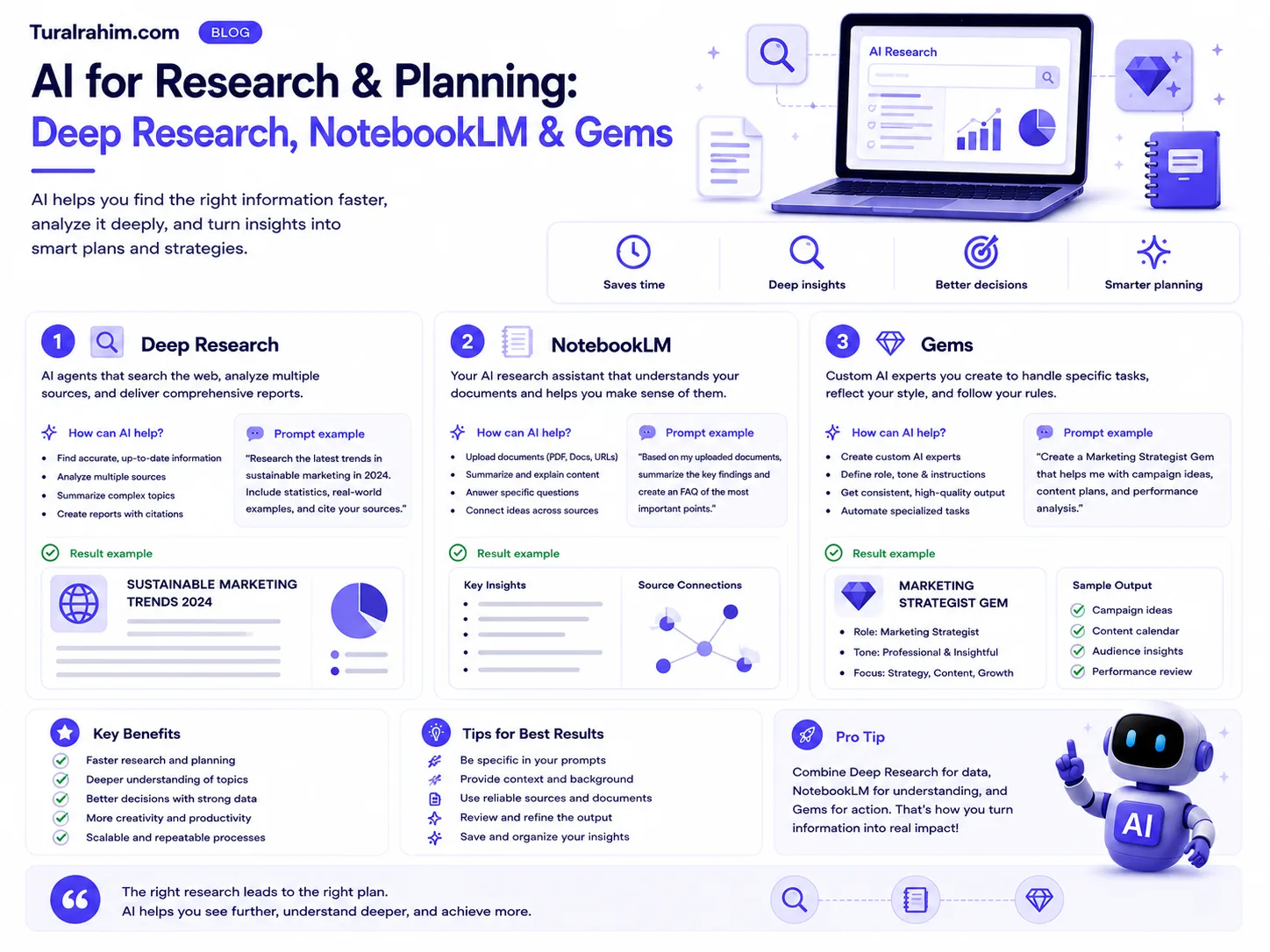
Competitor analysis, market research and project planning used to take days, sometimes weeks. With AI, exploring a topic in depth, reviewing dozens of sources and uncovering hidden risks in your plan can take just hours. You can combine AI research tools into a single workflow to gather sources, test ideas and identify gaps in your project plan.
This is the final and most strategic article in a ten-part series. I’ll show you how to use AI as more than a writing tool: as a researcher, critic and planner . We’ll explore three practical capabilities: deep research, a knowledge hub and expert assistants.
This article is part of the What Is Artificial Intelligence (AI)? is the final practical section of the guide.
🔬 AI Research: What Can Deep Research Do?
Standard AI gives you a direct answer to your question. Deep research mode works differently: you provide a topic, and AI reviews dozens, sometimes hundreds, of sources, compares and combines the information, and produces a report with source references.
This usually takes a few minutes, although complex topics may take longer. Think of the difference this way: with a conventional search, you open websites one by one and read them yourself. With deep research, AI does that reading for you and delivers a summary. You read one report instead of a hundred websites.
What can you use it for?
Competitor analysis: "Research the positioning, strengths and weaknesses of the 5 main competitors in Baku’s furniture market."
Market research: "What have been the trends in online furniture sales in Azerbaijan over the past 2 years?"
Getting to know a new sector: You’re entering a new market and need to understand it from the ground up.
The key: agree on the plan first
In tools such as Gemini, deep research presents a research plan before starting work. If you skip it without reading, you may end up with a report that takes the wrong direction.
The right approach: read and refine the plan.
"Use only sources from the past 2 years. Pay particular attention to price comparisons. Focus on the local market rather than the international market."
This makes the report relevant to your actual needs, rather than a collection of general information.
The golden rule: Deep research reviews many sources, but it can still make mistakes. The difference is that it provides references: follow the source links to verify the most important facts. This makes verification easier, but it does not remove the need to check.
📚 What Is NotebookLM For?
Deep research searches the web for information. But what if you want to work with documents you already have, such as reports, contracts, meeting notes and PDFs?
This is where NotebookLM (now called Gemini Notebook) and similar tools can help. You upload your documents, and AI uses your selected sources to answer your questions.
Why does it matter?
This type of tool bases its answers on your selected sources, although it can still make mistakes. It also provides source links in its answers, so you can see which document supports each point. This helps reduce the risk of hallucinations and makes answers easier to verify.
What can you use it for?
Making sense of multiple documents quickly: Upload 5 different reports and ask, "What conclusions do these reports share?"
A knowledge hub for your team: Bring all your project documents together and share them with the team. When someone needs to ask, "When do deliveries start?", they turn to the system instead of you.
Onboarding a new employee: Upload your instructions and policies and give the new employee access. They can find answers in the documents instead of asking you.
Some of these tools can also turn documents into an audio overview (similar to a podcast) or a diagram. You can listen to the audio overview while travelling or walking.
🧠 How to Create Your Own Expert Assistant
Explaining the same role every time gets tiring. Gem is a custom AI assistant you set up once and reuse. In Gemini, the transition from Gems to skills for personal accounts begins in November 2026.
For example, you could create an assistant called "SEO Consultant". You define its role, principles and information about your business once. From then on, you can ask your SEO questions directly without explaining everything from scratch.
How to set it up: meta-prompting
One practical method involves two steps:
Step 1: "What are the key qualities, principles and ways of thinking of an experienced SEO specialist?"
Step 2: Copy the answer into your assistant’s instructions and add: "You are this specialist. My role is: [my role]. Challenge my ideas, identify weaknesses and be honest."
Tip: if your assistant’s answers aren’t what you want, for example if the tone is too formal, adjust the instructions and add context: "I’m a small local business owner. Use simple, friendly language."
Some people even build a team of assistants : one project manager, one copywriter and one critic. You assign each task to the appropriate assistant.
Practical example: a 20-page report in 5 minutes
Imagine a real situation: you’ve received a 20-page market report and need to give feedback on it tomorrow, but you have no time to read it.
Upload the document to your knowledge hub and work through it step by step:
"Summarise the key findings of this report in one page."
"What are the 3 most important figures, and which pages are they on?" (Follow the source references to check.)
"What in this report is directly relevant to my business?"
Some tools also let you turn the report into an audio overview , such as a conversation between two presenters. Listen in the car, while exercising or as you get ready in the morning. This lets you absorb the main points even when you don’t have time to read.
💡 How to Brainstorm with AI
One of AI’s most underrated benefits is this: you don’t have to think everything through alone.
But there’s a catch. If you say, "Give me ideas", you may get average, predictable suggestions. The key is to ask for distinctly different options:
"Suggest names for our new service. Give me options in 3 different styles: one straightforward and professional, one fun and memorable, and one bold and unusual."
This gives you a choice, and the bold option often sparks an idea of your own, even if you don’t use it as suggested. AI’s idea may not be directly usable, but it can open up a new line of thought. The hardest part of creative work is often the blank page. AI fills it, giving you a starting point to develop your own direction.
Evaluating ideas
Coming up with ideas is half the job. To compare them, ask:
"Create a table comparing these ideas by cost (low/medium/high), expected benefit and main risk. Then recommend which one to start with on a limited budget."
🎯 How to Prepare for a Specific Goal
Deep research has a useful but lesser-known application: preparing for a specific event. This could be a job interview, an important meeting, a presentation or a negotiation.
For example, if you’re preparing for a job interview, you could give deep research this task:
"Prepare me for an interview for the [job title] role at [company name]. Gather information on the company’s recent activities, its market position, what would be expected of me in this role and typical interview questions."
You’ll get a detailed overview of the company, likely interview questions and even initial suggestions for answers. This first stage of preparation can take just a few minutes.
The same approach works for client meetings: research the other party’s business, needs and potential objections in advance so you arrive well prepared.
😈 How to Put Your Plan to the Test
This is one of the most valuable techniques in the entire series, yet it remains underused.
A good plan can withstand problems that arise later. But those problems can be difficult to anticipate because we become too attached to our own plans. Here, AI acts as an objective critic :
"Here is my plan: [your plan]. Play devil’s advocate. List 5 scenarios in which this plan could fail, starting with the most likely. Don’t just agree with me. Find the weakest point."
Why does this matter so much? AI sometimes tends to agree with the user. If you ask, "What do you think of my plan?", it may praise it without enough scrutiny. You need to explicitly ask for a critical assessment. This can help you spot a potential problem before the meeting.
📋 How to Find Gaps in Your Project Plan
Creating a plan is one thing; spotting a missing step is another. Major project problems often stem from overlooked dependencies.
"You are an experienced project manager. Here is my plan for [my project]: [plan]. Are there any dependencies or steps I’ve overlooked? Pay particular attention to tasks that depend on other teams or external parties."
Then focus on risk:
"Identify the riskiest step and suggest a contingency plan for it."
Your plan then answers both "What will we do?" and "What could go wrong, and what will we do if it does?" This is one of the key strengths of experienced managers: they try to spot problems before they happen.
⏰ How to Automate Recurring Research
Some research needs to be repeated. Competitors’ prices, industry developments and market trends require regular monitoring. Doing this manually every time is tiring, and it’s easy to forget.
Some tools let you create a scheduled task : you ask AI to repeat a specific piece of research at regular intervals.
"Repeat this research every week and give me a brief update on what has changed."
You then have a summary of industry developments every Monday morning without submitting a new request each time. This can be particularly useful in fast-moving fields such as marketing and technology: you spot developments promptly and adapt your decisions accordingly.
One note: this feature is not available in every tool, and access depends on your account and plan. It can also be used with personal Gemini accounts. Always check the dates of updates, as responses may have been prepared in advance.
🔄 How Does It All Come Together in One Project?
Suppose you’re launching a new product. From research to execution, AI can support you at every step:
1. Deep research: understand the market and your competitors.
2. Idea generation: explore positioning options.
3. Devil’s advocate: test your chosen positioning.
4. Planning + gap analysis: build an action plan and identify missing steps.
5. Knowledge hub: bring all your documents together and share them with the team.
You make the decisions at every stage. AI provides material, different perspectives and critical feedback, but you take action. These five steps could otherwise require weeks of work involving several specialists. AI speeds up the groundwork and makes it easier for small teams to conduct research and build well-founded plans.
🤖 What Do AI Agents Change?
For most of the tasks discussed so far, the process has been straightforward: you ask, AI answers, and you take the next step. An AI agent goes further: you give it a goal, and it plans and carries out the steps itself.
Think of the difference this way. You ask standard AI, "What do you know about competitors’ prices?", and it answers. You tell an agent, "Visit competitors’ websites, collect their prices, put them in a table and send it to me every Monday." With the right tools and permissions, it can carry out that task step by step.
This capability is powerful and requires careful oversight. An agent can, on your behalf, takes action on your behalf, so a mistake can lead to a real action, rather than just incorrect text. Follow these three rules:
Start small. Give the agent low-risk, reversible tasks first.
Check the results. Have the agent report what it has done, then verify the results yourself.
Set boundaries. State clearly what it can and cannot do.
Agents are still evolving, but the overall direction is clear: AI is moving from answering questions to taking action . Learning the basics today will put you in a better position to use these capabilities tomorrow.
⚠️ What Must You Always Check?
Research and planning underpin important decisions , which makes verification especially important.
Check facts against the source. Deep research provides source references. At a minimum, open the links supporting the key facts and verify the information.
Watch for bias. AI may present one side’s position more strongly. Ask, "What is the counterargument?"
The final decision is yours. AI lists the risks, but you decide which ones to accept because you are responsible for the outcome.
❓ Frequently asked questions
Is deep research free?
Some tools offer free access, but usage limits and available models vary by plan. I’ve explained what each tool offers the comparison article . Deep research is also available in Gemini.
How much can I trust AI research?
It is very useful for understanding the broader picture and choosing a direction. Before making an important decision, however, verify the key facts against their sources. A simple rule: AI starts the research; you verify the findings.
What is the difference between NotebookLM and standard ChatGPT?
ChatGPT is used for general conversation, working with files and web searches. NotebookLM, now called Gemini Notebook, focuses on research using your selected sources. Both can make mistakes. Source links help you check the answer to "Where did this fact come from?"
Do I need technical knowledge to create a Gem?
No. Creating a Gem requires no coding. Instructions in plain language are enough. Clear goals and rules remain important during the transition from Gems to skills. If you know how to write prompts , you can create an assistant like this too.
Are these tools worth using for a small business?
They are particularly useful for small businesses. Large companies have dedicated research, strategy and planning departments. In a small business, one person often handles all of this. AI can give that person support across several areas.
With so many options, where should I start?
Don’t try to master everything at once. It’s one of the most common mistakes. Choose one capability, such as deep research, use it in your actual work for a week and make it a habit. Then move on to the next. Knowing one capability well is far more valuable than having a superficial understanding of five, because a skill only delivers results at work when you use it consistently.
Can AI research replace a professional analyst?
Not for major, high-risk decisions. AI quickly gives you a broad overview, but it cannot replace deep industry expertise, contextual understanding or accountability. A better approach is to let AI do the initial research, then assess it using your professional judgement. Check the results for smaller decisions too. For major decisions, expert input is especially important.
Conclusion
This article brings the series to a close. One idea has run through it from beginning to end, and it bears repeating: AI doesn’t replace you; it makes you more capable.
In research, it reviews hundreds of pages for you, but you assess the findings. In planning, it lists the risks, but you make the decisions. When developing ideas, it offers options, but you choose.
To get more value from AI, use it less as an answer generator and more as a thinking partner . That is where the difference lies: rather than accepting a ready-made answer without checking it, you ask questions, compare options and reach your own conclusions.
The whole series in one place
These ten articles complement each other. Start wherever suits you:
The basics: What Is Artificial Intelligence? · How Does It Work? · Which Tool Should You Choose?
Prompting skills: What Is a Prompt? · Ready-to-Use Templates · Prompt Chaining
Practical applications: Writing and Communication · Content Creation · Data Analysis · Research and Planning (this article)
One thing remains: getting started. Choose one task this week and give it to AI. Keep going even if the result isn’t perfect. You can’t learn to play the piano without touching the keys. Learning begins with that first touch.
To turn these insights into campaign decisions, media planning and strategy visit my page.
Topic: Artificial Intelligence: posts in this topic →

About the author
Tural Rəhimov
Digital Marketing Manager: UM Azerbaijan
Digital marketing manager at Universal McCann (UM Azerbaijan). Experienced in Google Ads, Meta Ads, TikTok Ads and media planning. I help brands grow online.
More about me →Need digital marketing support for your business?
Let's talk: I can help with everything from strategy to ad management.