Writing and Communicating with AI: Emails, Reports and Meeting Notes
17 İyul 2026·Updated: ·⏱ ≈11 min·👁 192 views
Contents
- ⚖️ Writing with AI: What Should AI Do, and What Should You Do?
- 📝 How Do You Turn Meeting Notes into an Action Plan?
- 👥 How Do You Adapt the Same Message for Different People?
- 🔍 How Do You Get AI to Critique Your Work?
- 🎙️ How Can You Rehearse a Difficult Conversation?
- 🌐 How Does AI Translation Differ from Google Translate?
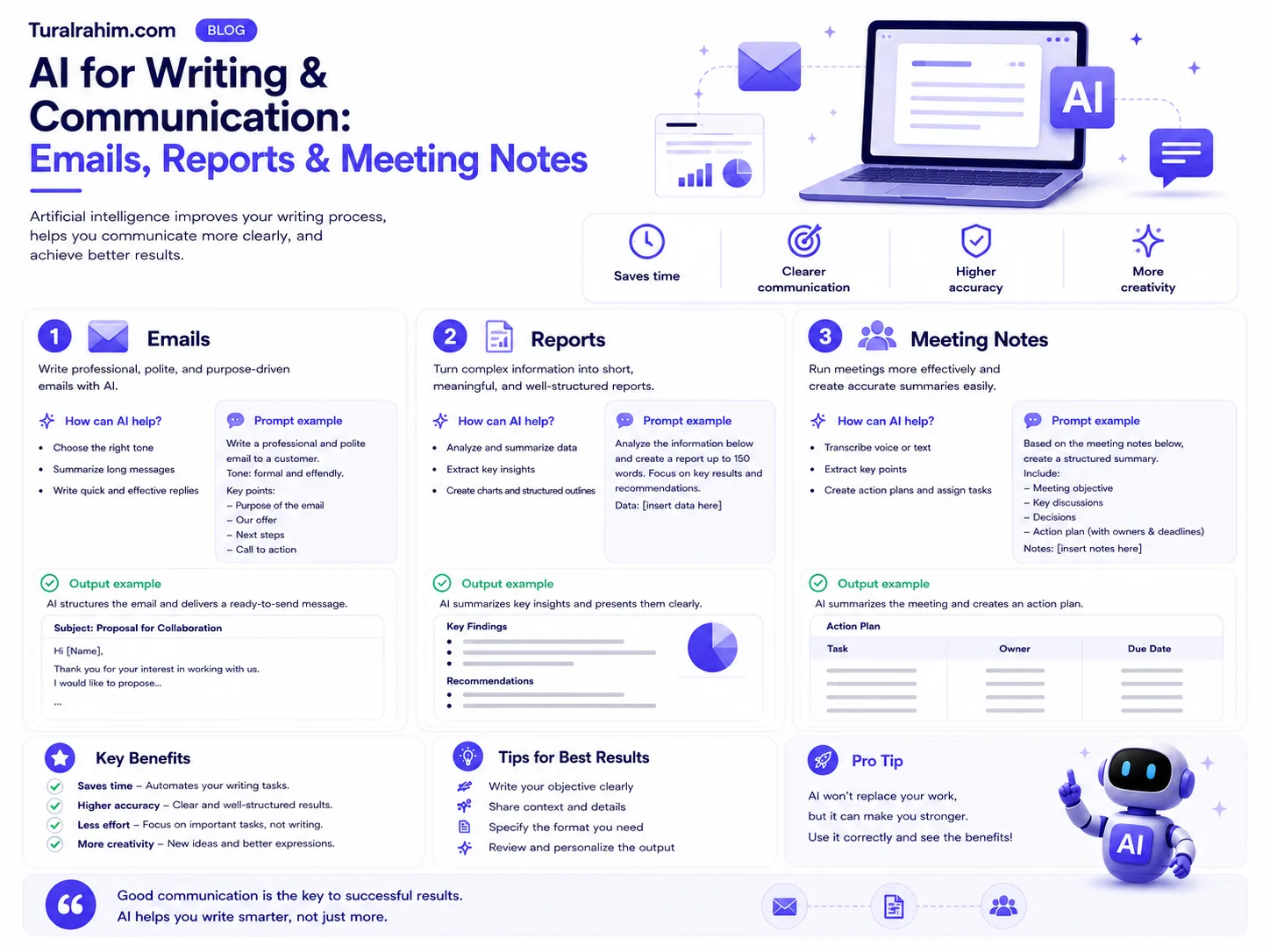
- 📧 How Do You Draft an Email in Practice?
- 🎨 How to Make AI Writing Sound Like You
- ⏱️ Where Does AI Writing Save Time in Everyday Work?
- 🚦 When Should You Avoid Using AI?
- ❓ Frequently Asked Questions
- Conclusion
Writing about the same development to your manager, your client and your team is really three different tasks. Your manager needs a three-point summary, your client needs an explanation and reassurance, and your team needs clear instructions. Writing all three separately takes hours. With AI, it takes minutes. When writing with AI, you can adapt the same information to suit the recipient, whether as an email, a report or a task brief.
But there is a trap that many people fall into: if you ask AI to "write it for me", the result may not sound like you. In this article, I will show you how to use AI as an editor and coach rather than a ghostwriter . That is what makes the difference.
This article is part of the What Is Artificial Intelligence (AI)? is the practical section of the guide, with examples drawn from marketing work.
⚖️ Writing with AI: What Should AI Do, and What Should You Do?
Before we begin, let us set some boundaries. There are five aspects of communication that you should never hand over entirely to AI, because some of the information they require is known only to you.
Purpose. What do you want this message to achieve: persuade, inform, reassure or motivate? A message without a clear purpose misses its mark.
Audience. You know best what frustrates your manager and what upset your client last time.
Voice. The message should sound like you. You make the final edits.
Responsibility. You are responsible for the consequences of your words. Read every sentence before you send anything.
Strategic judgement. Sometimes the best decision is to call rather than send an email. Sometimes it is to write nothing at all. That decision is yours to make.
So what does AI do? The time-consuming work: generating alternatives, structuring text, getting you past the blank page, polishing your writing and helping you practise. You share the work: you keep the strategic decisions and AI handles the routine tasks. Get that balance right, and business correspondence becomes easier and your messages more effective.
The Golden Rule: You often get weak results from AI when you say "write it for me". You get better results when you say "I have written it. Now critique it" .
📝 How Do You Turn Meeting Notes into an Action Plan?
This is one of the quickest ways to save time. After a two-hour meeting, you have 20 pages of notes that nobody reads. As a result, the actions you agreed on are forgotten.
Try this:
"You are an experienced project manager. Prepare a report based on the meeting notes I have attached. Sections: decisions made · action items (who, what, by when) · unresolved questions · expected outcomes before the next meeting."
Then, and many people skip this step, ask AI to review its own output:
"Assess this report against these criteria: conciseness · clarity of action items · named owners. Identify weaknesses and fix them."
Why the second step? Because the first report often describes tasks with phrases such as "the team will look into this", without naming anyone responsible. The second step helps uncover these gaps.
An important warning
Before uploading meeting notes to AI, pause: do they contain confidential information? A client name, a pricing agreement, a staffing issue or a salary figure? If so, either remove that information or use a company-approved enterprise tool in line with your company's rules. The consequences of getting this wrong can be difficult to undo.
👥 How Do You Adapt the Same Message for Different People?
Now for the approach that saves the most time. The key is to follow three steps.
Most people write: "Draft an email to the finance director based on this report." The result is generic because AI has not been asked to analyse the finance director's priorities . It has gone straight into writing.
A better approach:
Step 1: Extract: "Extract the 7 most important points from the report I have attached."
Step 2: Analyse: "Which of these points matter to the finance director (who focuses on budget and revenue), and which matter to the head of operations (who focuses on resources and deadlines)? First consider each person's priorities, then explain your selection."
Step 3: Draft: "Now write a short email to the finance director. Present the points you selected for them as bullet points."
Asking for a separate analysis of priorities in step 2 can make the result more focused. This is one of the simplest forms of prompt chaining .
🔍 How Do You Get AI to Critique Your Work?
This is one of the most valuable techniques in this article, and one of the least used.
You have prepared an important proposal, report or presentation. Before sending it, ask AI to take on the recipient's role:
"I am preparing a proposal for [purpose]. You are [role, for example: a budget-conscious, risk-averse finance director], and [these are your priorities]. Read the attached document from your perspective. What information do you think is missing, and what risks do you see?"
Do not stop after reading the answer. Keep the conversation going, because the real value comes from the discussion that follows, rather than the first response:
"I plan to address the [problem] you identified like this: [your solution]. Does that resolve your concern, or is anything else needed?"
This helps you prepare for difficult questions before the meeting, hearing them from AI before your manager asks them. It is a low-cost way to practise.
There is one catch: AI sometimes agrees with you too readily. Ask "What do you think?" and it may say "Great!" So explicitly ask for criticism: "Do not praise it. Only point out weaknesses."
🎙️ How Can You Rehearse a Difficult Conversation?
Few people know about this option, and fewer still use it.
Tomorrow you need to speak to an unhappy client. Or ask for a pay rise. Or give a team member unwelcome news. With AI, you can rehearse these conversations in advance.
"Let us role-play. You are [role, for example: an angry client whose order is two weeks late]. Here is the situation: [what happened]. I am calling you, and you answer the phone. Stay in character, do not go easy on me, and behave like a real client."
Finish the conversation, then end the role-play and ask for feedback:
"End the role-play. Now assess my approach: my strengths, my weaknesses and the specific things I should do. Pay particular attention to my ability to defuse the situation."
Some tools also let you do this by voice , so you can actually speak. Practising this way before the real call may help you feel less nervous.
Why does it work? Because what throws us off in difficult conversations is often an unexpected question, rather than a weakness in our arguments. We rehearse a conversation in our heads a hundred times, but always follow our own script: the other person says what we expect. In real life, they say something completely different, and we freeze. Role-play lets you experience that unpredictability in advance. And mistakes here have no effect on your actual client relationship.
🌐 How Does AI Translation Differ from Google Translate?
This is one of AI's underrated capabilities. It is particularly useful for us in Azerbaijan, where business correspondence often takes place in three languages.
What is the difference? Google Translate also uses AI, but a conversational tool lets you explain your intent in detail.
Take a simple example. You write in Azerbaijani: "We would be grateful if you could reconsider this matter." Google Translate may provide a contextually appropriate translation, but the level of formality may not suit your needs. With a conversational tool, you can provide extra context and ask it to express the same intent in language suited to English business correspondence.
So when asking for a translation, do not just say "translate this". Say this:
"Translate this email into English. The recipient is [who, for example: a potential partner in Germany]. Avoid a literal translation. Preserve my intent, but make it sound appropriate for their business culture. Keep the tone professional but warm."
It works in the other direction too. Here is how you can make sense of a long, complex contract in English:
"Rather than translating this text into Azerbaijani, explain it. Tell me in plain language: what am I agreeing to, what obligations am I taking on, and which clauses could pose a risk for me?"
A word of caution: have a lawyer review legal documents. AI helps you identify what questions to ask , but it does not replace a lawyer.
📧 How Do You Draft an Email in Practice?
So far, we have covered the techniques. Let us bring them together in one example.
The situation: A client's order is two weeks late. The responsibility is yours, following a problem with a supplier. The client has already sent one angry message. Now you need to write to them.
The wrong approach: "Write an apology email to a client about a delayed order." The result: "Dear customer, we apologise for any inconvenience caused. Your satisfaction is important to us..." In other words, a template that says nothing.
A better approach: four steps:
1. Explain the situation before asking for a draft: "Here is the situation: [full description]. The client has already sent one angry message. Consider what might be worrying them most right now and suggest 3 possibilities. Do not write the email yet."
2. Choose a strategy: "They are probably worried that we will miss the new deadline too. What should the email include to address that concern?"
3. Ask for a draft: "Now write the email. Requirements: take responsibility, make no excuses, give a specific date and explain why we can meet it this time. No more than 5 sentences. Avoid phrases such as 'Your satisfaction is important to us'."
4. Ask for a critique: "Now you are that client. Read this email. Are you convinced? Which sentence made you even angrier?"
Four steps, around five minutes. Instead of a generic apology, you can produce an email that explains how you will resolve the problem .
🎨 How to Make AI Writing Sound Like You
The complaint I hear most often is: "AI writing sounds artificial. That is not how I write."
That is true. One reason lies in how the model works: it selects the next token based on probabilities. With little guidance on style, the text can end up sounding like everyone else's.
There are three solutions:
1. Provide examples of your own writing
"Below are 3 pieces I have written previously. Analyse my style: sentence length, word choice and tone. Then write [the new text] in the same style."
This is an effective technique. For AI to recognise your voice, it needs to hear it .
2. Say what you do not want
Sometimes saying what you do not want is more effective than giving general instructions:
"Do not use these phrases: 'in a rapidly changing world', 'unique solution', 'quality and reliability', 'your success is our success'. Do not use emojis. Do not use exclamation marks."
3. Let AI provide the outline, then flesh it out yourself
The most straightforward approach is to ask AI for a structure , then write the text yourself. "Which 4 points should this email cover, and in what order?" Then express those points in your own words.
That solves the blank-page problem while keeping the writing your own.
This approach has another, less obvious benefit: when you write the text yourself, you really think about what you are saying. If you simply read an AI draft and say "that looks good", you may skip that thinking stage. The difficulty can become apparent at the first question in a meeting, when you struggle to justify the ideas in your own document.
⏱️ Where Does AI Writing Save Time in Everyday Work?
Let us be specific. These are the main office tasks where AI can save time, especially when working with long texts:
Summarising long texts
You have received a 40-page report and need to discuss it tomorrow. "Extract the 5 key points from this document and explain each in one sentence." You can get a summary in a few minutes. Then ask for more detail on a point that interests you: "Explain point 3 in detail."
One caveat: reading a summary is not the same as reading the document. Read the sections your decision will depend on yourself.
Turning notes into a draft
You have been jotting down scattered notes on your phone all week. Give them to AI as they are and say: "These are my weekly notes. Prepare a well-organised report to send to my manager: what I did, what results I achieved and what questions remain."
The advantage of this approach is that the source material is yours, and AI simply organises it. That makes it easier for the result to sound natural.
Exploring different responses
You are unsure how to reply to a difficult email. "Suggest 3 different approaches to replying to this email: one firm, one neutral and one conciliatory. What might the outcome of each be?"
You will not send all three, but seeing them will help you decide where you stand .
Spotting what you have missed
"I am about to send this email. What question might the recipient ask that it does not answer?" One sentence can often help prevent another round of correspondence.
🚦 When Should You Avoid Using AI?
Let us be honest: there are situations where turning to AI may be the wrong choice:
Condolences, congratulations and apologies. In personal relationships, an unedited template can seem insincere and damage the relationship.
Correspondence containing confidential information. If your company has no approved tool, do not upload this information to a public tool.
A two-sentence message. "Shall we meet tomorrow at 3?" Writing that yourself is quicker than explaining it to AI.
When sending the message is the wrong choice. This matters most: sometimes the problem lies in the decision to send a message at all. Do not rely on AI to tell you "do not write this, go and speak face to face". You need to make that decision yourself.
❓ Frequently Asked Questions
Should I tell the client I used AI to write it?
If you have edited the text and taken responsibility for it, you are sending it in your own name. Whether you need to disclose AI use depends on the situation. Consider your company's policy, the terms of your contract and any applicable requirements. A simple test: if you feel the need to hide it, reconsider how much of the work you are handing over to AI.
Will AI weaken my writing skills?
If you let AI write and send the result without thinking, your skills may weaken. But if you ask AI to critique your own writing, you can learn about weaknesses and their causes each time. The tool is the same, but the outcome can be different. The difference lies in how you use it.
Is it suitable for correspondence in Azerbaijani?
For simple tasks, yes. In longer, formal texts, some sentences can sound translated. In that case, add this to the end of your prompt: "Write in natural Azerbaijani, without making it sound like a translation." If that does not help, get the structure from AI and write the text yourself.
Which tool is best for writing?
You can try Claude for long documents and text editing. Gemini is a convenient option for working within Gmail and Docs. For more detail: ChatGPT, Gemini and Claude Compared.
How do I teach my team to use this?
Instead of teaching theory, share a prompt chain that works. For example, put the prompt for turning meeting notes into an action plan in a document and share it with the team. When people see the results, they will start asking questions themselves. Give them a useful example and show them how to use it.
Who legally owns AI-generated text?
That depends on the country's laws, the person's creative contribution and the tool's terms. Copyright and responsibility for the text are separate issues: if you send the text, checking its content is your responsibility too. An incorrect figure, a misleading promise or an offensive sentence can cause problems for you. So read every sentence. This is about protecting yourself as well as ensuring quality.
Are there ready-to-use templates?
Yes. You can find ready-to-use prompts for the techniques in this article here: Prompt Examples: 20 Ready-to-Use Templates.
Conclusion
AI does not replace you in communication, it saves you time. You spend more time thinking about what needs to be said and less time struggling with how to say it.
Notice that none of the techniques in this article amounts to "let AI write it for me". They all follow this approach: let AI suggest options, critique my work and help me practise, while I make the decisions.
Try one thing this week: write your next important email, then ask AI to read it from the recipient's perspective. Ask "What did you find unconvincing?" The answer may surprise you, and you will probably revise the email before sending it. That is the point: AI's job goes beyond writing text to holding up a mirror for you.
Next step: the visual side: Creating Content with AI: Images, Videos and Presentations
If you need to bring your channels and budget together in one plan, my media planning and strategy service explains how I approach this work.
Topic: Artificial Intelligence: posts in this topic →

About the author
Tural Rəhimov
Digital Marketing Manager: UM Azerbaijan
Digital marketing manager at Universal McCann (UM Azerbaijan). Experienced in Google Ads, Meta Ads, TikTok Ads and media planning. I help brands grow online.
More about me →Need digital marketing support for your business?
Let's talk: I can help with everything from strategy to ad management.