ChatGPT, Gemini and Claude: which AI is right for your work?
17 İyul 2026·Updated: ·⏱ ≈11 min·👁 827 views
Contents
- ⚡ The short answer: ChatGPT, Gemini or Claude?
- 🟢 ChatGPT (OpenAI)
- 🔵 Gemini (Google)
- 🟠 Claude (Anthropic)
- 💰 Pricing (November 2026)
- 🇦🇿 Which is best for Azerbaijani?
- 🎯 ChatGPT, Gemini or Claude: which suits your work?
- 🔄 Can you use all three together?
- 🧪 How to compare them yourself: 3 tests
- 🔍 What else is available?
- ❌ The 3 most common mistakes when choosing an AI tool
- ❓ Frequently asked questions
- Conclusion
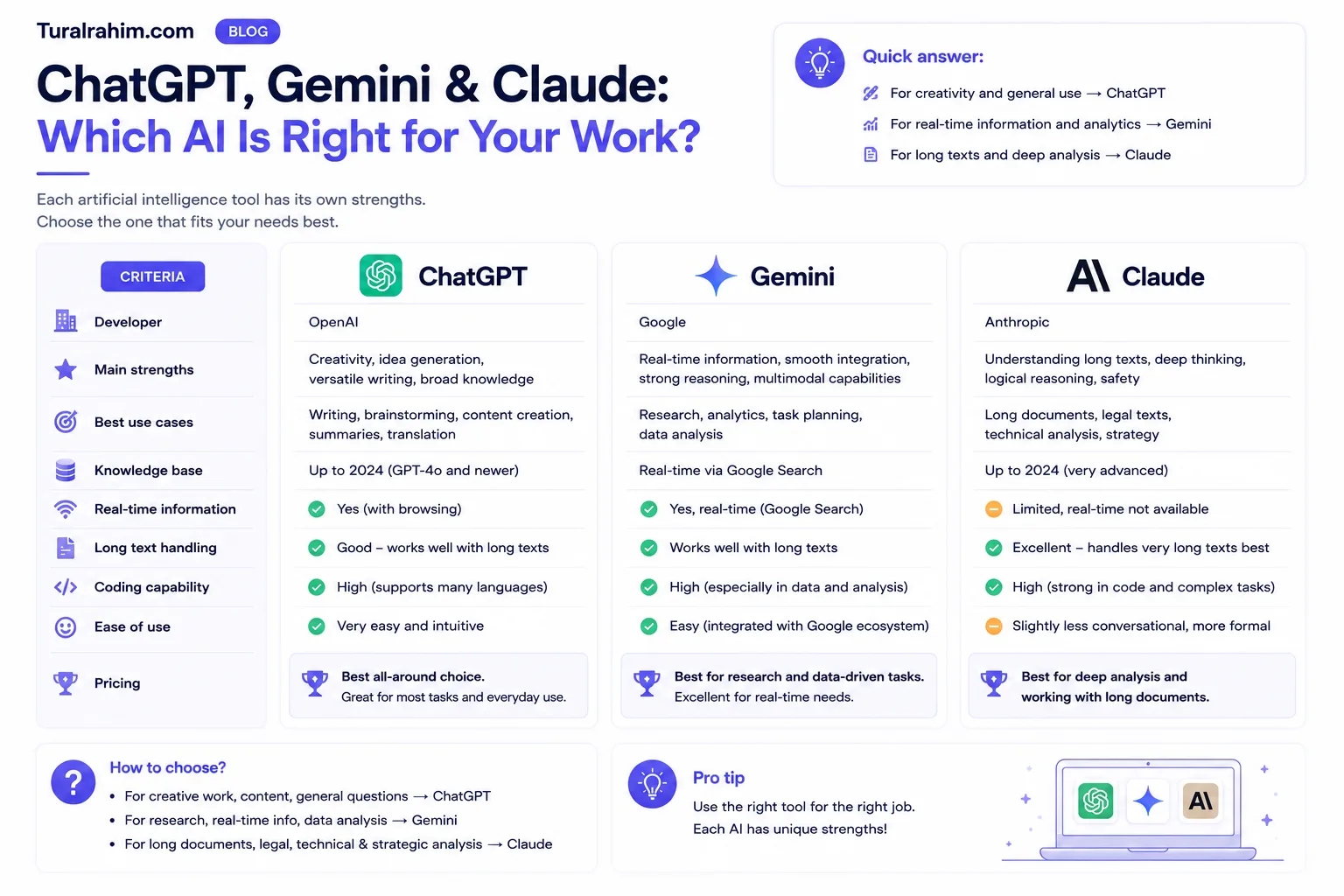
The short answer: All three are powerful, and all three have a free version. The right choice depends on your work: if you use Google tools (Gmail, Sheets, Docs), choose Gemini, if your work centres on long documents and polished writing, choose Claude, for everyday tasks and an easy start, choose ChatGPT. When choosing between ChatGPT, Gemini and Claude, consider your daily tasks, the tools you use and your writing needs.
But that answer is very broad. Below, I compare all three using real work scenarios: their strengths, their weaknesses, what they cost and, most relevant to Azerbaijani-speaking readers, which handles Azerbaijani best.
This article is part of the What Is Artificial Intelligence (AI)? guide.
Note: The prices in this article are for the US market and reflect rates as of November 2026 . Prices in this sector can change several times a year. Check the provider's website before paying.
⚡ The short answer: ChatGPT, Gemini or Claude?
Short on time? Read these three sentences instead of the table:
Choose ChatGPT: if you are new to AI, need help with a range of tasks (writing, ideas, images, translation) and want support from a large user community. There are plenty of tutorials available.
Choose Gemini: if you spend your day in Gmail, Google Docs and Google Sheets. Having AI directly in the document you are working on makes a big difference. Its Deep Research feature is also strong.
Choose Claude: if you work with long documents (reports, contracts, research) and writing quality is your top priority. Its writing often feels more natural and less formulaic.
The best approach is to try all three for free for a week. An article cannot make the decision for you. Your work has its own requirements.
🟢 ChatGPT (OpenAI)
This is the tool that introduced AI to the world. Launched in late 2022, it became a household name within months. It remains one of the most widely used AI tools.
Strengths
Versatile. Text, images, code, translation, voice conversations and file analysis, all in one place. It offers a broad range of capabilities as a general-purpose tool.
Easy to learn. There are countless resources about ChatGPT online. If you run into a problem, finding an answer is easy.
Custom GPTs. Set one up once (for example, "an assistant that writes social media copy in my brand's voice"), then use your ready-made assistant whenever you need it.
Built-in image generation. There is no need to switch to a separate tool.
Weaknesses
You can quickly reach the free version's usage limits. With heavy use, you may have to wait before continuing, depending on the model and task.
Sometimes overly "polite". The writing can feel formulaic and full of unnecessary praise, so it needs editing.
Results vary with long documents. When analysing a 100-page report, quality depends on the model you choose, the file's structure and the task.
Best for
Beginners, entrepreneurs, office workers and students. If you are unsure which to choose, start here.
🔵 Gemini (Google)
Google's answer to AI assistants. Its biggest advantage lies in the tools it integrates with.
Strengths
Integrated with the Google ecosystem. It drafts email replies in Gmail, edits documents in Docs and creates formulas in Sheets. There is less need to copy and paste text: in practice, this makes the biggest difference.
Deep Research. Give it a topic, and it researches sources online and produces a report with references. Very useful for competitor analysis and market research.
The
=AI()function in Sheets. It categorises customer reviews using a formula and generates results in up to 350 cells at a time. For marketers, this can save considerable time.Video generation offers more options on paid plans.
Weaknesses
The best features require a paid plan. AI features in Sheets require an eligible plan, while video generation has limits on the free version.
Confusing plans. AI Plus, AI Pro, AI Ultra, plus two Ultra tiers: working out what each includes takes time.
Pricing and features can change. Before subscribing, check Google plan prices, usage limits and availability in your country.
Best for
Teams using Google Workspace, people working with data and researchers. If your company uses Gmail and Google Drive, Gemini is a good starting point.
🟠 Claude (Anthropic)
Less widely known than the other two, but popular among professionals.
Strengths
Writing quality. Its writing often feels more natural and less formulaic, reducing the time you spend editing.
Long documents. It can process hundreds of pages of text within the model's context limit. Useful for contracts, reports and research.
Strong analysis. You can use it to identify weaknesses in your plans. Asking "What is the weakest point in this idea?" can help you get useful, critical feedback.
Cheaper with annual billing: the Pro plan costs less than paying monthly.
Weaknesses
No image generation. If you need to create images, you will need another tool.
Integrations require separate setup. A Gmail connection is available; the Docs and Sheets add-on is in beta on eligible paid plans.
Few learning resources in Azerbaijani. Finding help can be difficult if you run into a problem.
Sometimes overly cautious: it may refuse some requests unnecessarily.
Best for
Writers, lawyers, analysts and anyone working with long documents. If writing quality is your top priority, try Claude.
💰 Pricing (November 2026)
All three offer a useful free version. I want to emphasise this because many people assume AI always costs money. A free version may be enough for learning and most everyday tasks.
In practice, paid plans fall into three tiers:
Budget entry-level plans (around $5–10/month)
ChatGPT Go: $8/month. Higher usage allowances than the free version.
Google AI Plus: starts at $4.99 per month in the US; prices may vary by country and package. Check the current price on Google's own website before subscribing.
Claude: no plan at this price point.
Standard professional plans (around $20/month): the most popular choice
ChatGPT Plus: $20/month. Powerful models, deep research, Projects and custom GPTs.
Google AI Pro: $19.99/month. Gemini integration with Docs/Sheets/Gmail, higher usage limits and cloud storage.
Claude Pro: $20/month (around $17/monthwith annual billing). Higher usage limits, projects and access to more models.
Notice that all three cost roughly the same. That means your work should determine your choice, rather than the price.
Advanced plans ($100–500/month)
ChatGPT Pro ($100, $200 or $500/month), Claude Max ($100/month), Claude Ultra ($200/month) and Google AI Ultra ($99.99 or $199.99/month) are designed for professionals who work with AI throughout the day. Most everyday users will not need them. Reach the limits of a $20 plan first, then consider upgrading.
The golden rule: Start for free. Pay when you reach the limits, and only then. Subscribing to all three tools at once is the most common waste of money I see: you end up spending $60 a month without learning to use any of them well.
🇦🇿 Which is best for Azerbaijani?
There is no single answer that suits everyone, so let's be honest about it.
All three can read and write Azerbaijani. But results may be less consistent than in English. One contributing factor may be tokenisation : the way words are split into tokens, along with the volume and quality of training data, varies between languages.
Here is what you may notice in practice:
For simple tasks (emails, posts, summaries), all three are useful. Feel free to write your prompts in Azerbaijani.
In complex or lengthy texts, sentences can sometimes sound translated and feel unnatural.
For local context, including Azerbaijan's market, legislation and local details, all three can provide incorrect information. Check their answers.
An approach worth trying: give a complex task in English, then ask for the result to be translated into Azerbaijani. Compare the difference yourself. Or try this prompt: "Write the answer in Azerbaijani, using lively, natural language that does not sound translated."
🎯 ChatGPT, Gemini or Claude: which suits your work?
Here are my recommendations for specific scenarios:
Marketer: Gemini (data analysis in Sheets + competitor research with Deep Research) + ChatGPT (content and visuals). The two complement each other.
Small business owner: ChatGPT. One tool, many tasks. Simplicity matters here.
Content writer: Claude. The difference in writing quality can become clear in your daily work.
Analyst / finance professional: Gemini (Sheets integration) or Claude (long reports).
Student: Use the free versions. Only pay when you need to.
Working in a team: Consider the ecosystem your company uses. Google Workspace → try Gemini.
🔄 Can you use all three together?
Yes, you can use several tools together, including their free versions.
A practical approach is to subscribe to the tool you use most and keep using the free versions of the other two. For important tasks, it helps to ask two tools the same question and compare their answers: agreement does not guarantee accuracy, while conflicting answers call for further checks.
This approach can help you spot hallucinations, but it does not replace checking sources.
🧪 How to compare them yourself: 3 tests
My recommendations cannot account for every detail of your work, so testing the tools yourself is the best approach. One week and three tests are enough.
There is one rule: give all three the same task, using exactly the same wording. Different prompts make the comparison less reliable.
Test 1: Your own writing
Take a real work email or post and ask all three: "Make this clearer, but keep the tone." Then compare the three responses side by side.
What to look for: which one preserved your style ? Which changed your writing beyond recognition and made it formulaic?
Test 2: Your own document
Upload a work document (a report, proposal or spreadsheet) and ask the same question: "What is the weakest point here?"
What to look for: which one engaged with the actual document, and which settled for generic comments? Which told you something you did not want to hear, but which was true nonetheless?
Test 3: Local context
Ask a question about the Azerbaijani market whose answer you know for certain. For example, ask about a specific detail in your field.
What to look for: which one was willing to say "I don't know", and which confidently made things up? This is the most valuable test, because it shows where the tool may give incorrect answers.
After these three tests, making a decision will be easier. That decision will be far more useful than my recommendation or any other article's, because it is based on testing with your own work.
🔍 What else is available?
The market extends beyond these three names. Here is a brief look at the alternatives to give you the broader picture.
Microsoft Copilot: works within Word, Excel and Outlook. If your company uses Microsoft 365, Copilot plays a similar role to Gemini in Google's ecosystem. It uses various AI models.
Perplexity: an AI search tool with chat capabilities. It includes source links in its research answers. Useful for fact-checking, but you still need to read the cited sources.
DeepSeek, Qwen and other open models: offer low-cost or free options. Where your data goes depends on the service you choose and where you run the model.
Grok (xAI): integrates with X (Twitter), making it an interesting option for tracking social media trends.
My advice: explore these later. First, learn to use one of the main three tools well. Collecting tools does not build skills.
❌ The 3 most common mistakes when choosing an AI tool
1. Collecting tools
This is the mistake I see most often. Someone signs up for five tools, asks each a question or two and never learns to use any of them properly. They end up with a passing knowledge of all five, but no practical skills.
The reality is that someone who knows one tool well can be far more productive than someone with a superficial knowledge of five.
2. Waiting for "the best"
"I'll wait a little longer. Something better will come along." This mindset keeps people waiting for years. New developments arrive every month in this field. If you wait for the perfect moment, you will never start. The tools available today are already powerful enough for the work you need to do today.
3. Expecting magic
I often hear, "I subscribed to ChatGPT, but the results aren't good." Start by looking at the instructions: results depend on both the tool and the clarity of the task. Even the most expensive plan can give a poor answer to a vague question.
❓ Frequently asked questions
Which AI is the smartest?
The question is too broad. All three are powerful, but results vary by task and model. Today's comparison of the "smartest" AI may be outdated in three months. A better question is: which one fits my workflow?
Is the free version really enough?
For many users, yes. If you regularly reach usage limits and AI has become part of your work, that is the time to pay. Until then, use the free version.
What is the real difference between free and paid versions?
Many people assume a paid plan simply gives them "smarter AI". One of the main differences is usage limits: how many messages you can send, how many files you can upload and how long your documents can be. Paid plans may also provide access to more powerful models and extra features (deep research, video, integrations). So your subscription gives you a choice of models as well as greater capacity and more features to work with.
Can I pay from Azerbaijan?
That depends on the service's availability in your country, your bank and your card. Conditions also change from time to time, so I cannot give a definitive answer here. Check each provider's website for supported countries and payment methods.
Is my data safe?
When using public AI services, do not upload confidential information: client contracts, personal data or internal financial reports. Personal accounts have privacy settings that let you control whether conversations are used to train models. But the safest rule is simple: before uploading, ask yourself, "What would happen if this information became public?"
Which should I choose for my team?
One of the key considerations for a team is the ecosystem. If your company uses Google Workspace, Gemini may fit more easily into daily work; if it uses Microsoft 365, Copilot may be a better fit. Learning a new tool takes time. AI is easier to use when it appears in an app the team already works in, while opening a separate website adds another step.
Which of these tools will still be around in a few years?
The honest answer is: I don't know. Be sceptical of anyone who claims to know for certain. But there is no need to worry: the skills you learn will outlast the tool. Once you have learnt to write a good prompt, that skill stays with you, whichever tool comes out on top.
Will I lose my work if I switch tools?
Your conversation history stays in the original tool. You can try your prompts in other tools, though the results may differ. That is why you should keep your own prompt library in a separate document, rather than storing it only within the tool.
Conclusion
The most important lesson from this comparison is: your choice of tool alone does not determine your results. All three are powerful. A weak prompt can produce poor results even on the most expensive plan.
My recommendation is to choose one, use it seriously for a month, then try another. Trying to learn all three at once can split your attention and make learning harder.
Do not be afraid of making the wrong choice. This is not a lifelong commitment: if you change your mind after a month, you can cancel and switch. The real loss comes from never starting because you cannot make a decision.
Chosen your tool? Now let's get to work. Your results also depend on the question you ask: What Is a Prompt? The 3C Rule for Better AI Answers
To turn the information you gather with these tools into campaign decisions, my media planning and strategy service visit my page.
Topic: Artificial Intelligence: posts in this topic →

About the author
Tural Rəhimov
Digital Marketing Manager: UM Azerbaijan
Digital marketing manager at Universal McCann (UM Azerbaijan). Experienced in Google Ads, Meta Ads, TikTok Ads and media planning. I help brands grow online.
More about me →Need digital marketing support for your business?
Let's talk: I can help with everything from strategy to ad management.