Writing and Communication with AI: Email, Reporting, and Meeting Notes
17 İyul 2026·👁 32 views
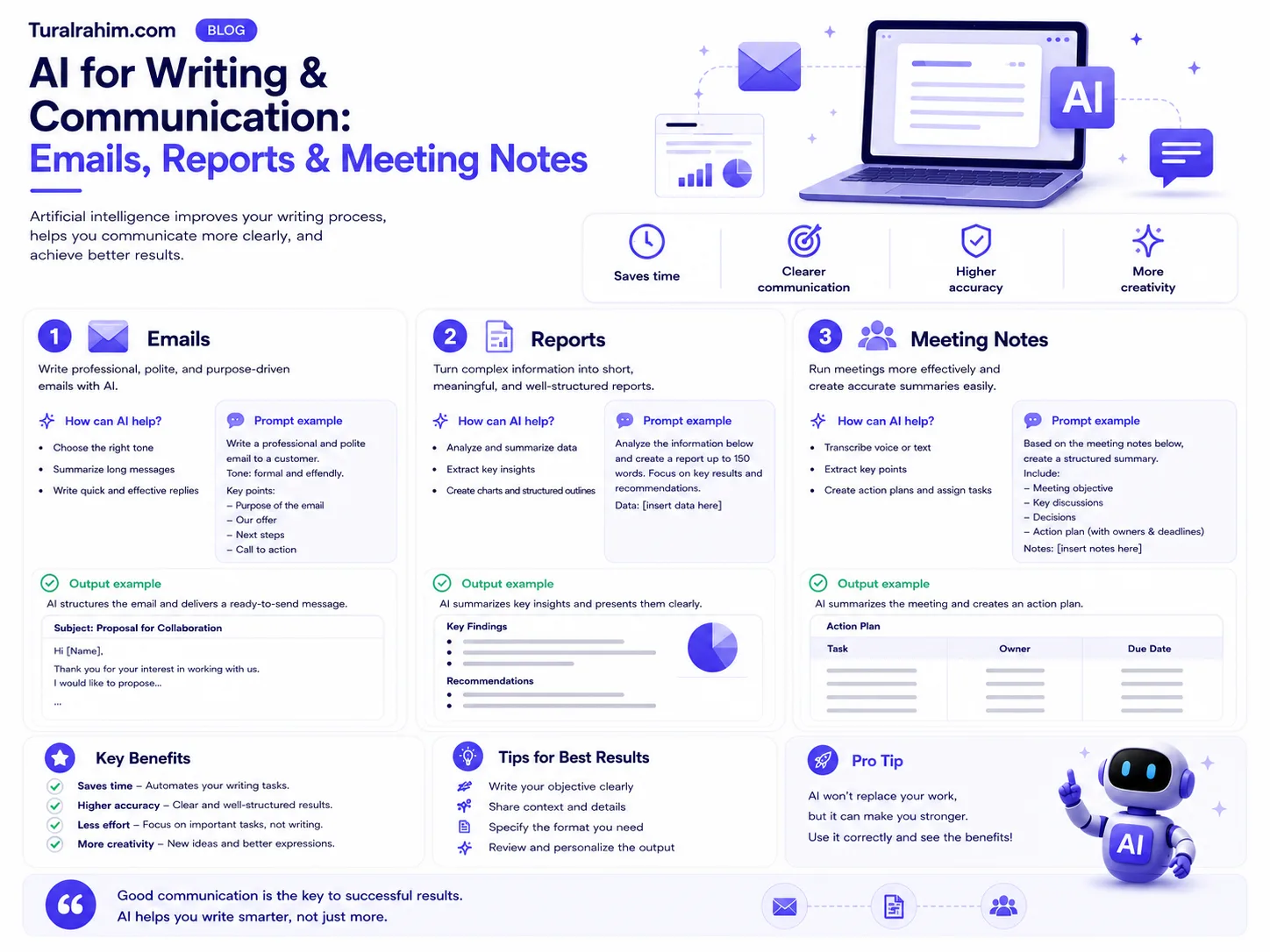
Writing the same news to your supervisor, customer, and team is actually three different things. The manager needs a three item summary, explaining and reassuring to the customer, and a specific task to the team. It takes hours to write three separately — And minutes with AI.
But here's a trap, and most of it falls there: If you tell AI to “write it to me,” the result won't sound like you. not as a shadow writer, but as an editor and coach i'll show you how to operate — here's the difference.
This post What is Artificial Intelligence (AI)? the application part of the guide and examples are based on marketing work.
What ⚖️ AI Means, What Do You Do?
Before we get started, let's draw a border. There are five things in communication that aI can never replace them for you — because you only have the information you need for them.
Purpose What do you want to do with this message — persuade, inform, calm, inspire? A message that doesn't know the purpose doesn't hit the goal.
Audience You only know what your manager is nervous about, what your customer hurt last time.
Sound The message should sound like you. You're the final editor.
Responsibility The outcome of the words is upon you. Do not send without reading every sentence.
Strategic judgment. Sometimes the right thing to do isn't an email, it's a call, and sometimes it's a not to write anythingThis doesn't make sense.
So what's AI doing? The time-consuming part: builds options, builds structure, solves a blank page problem, polishes, exercises. That means you share the labor-the strategic part stays with you, and the mechanical part moves to AI. If you set this split straight, communication will come out easier and stronger.
Golden Rule: You get the worst results from AI when you say, “Write to me,” and the best thing is "i wrote, now you're broken" when you say.
Convert 📝 Meeting Notes to Worksheet
The fastest earnings are here. After a two-hour meeting, 20 pages of notes are left on your hand, and no one reads it-as a result, what you agree to is forgotten.
Do this:
“You're an experienced project manager. Make a report based on the meeting notes I've added. Sections: decisions made · tasks to be carried out (who, what, when) · open-ended questions · expected results until the next meeting.”
Then — and this leaves most of the step — self-check the result:
“This report is evaluated by: briefness · clarity of tasks · showing the person responsible. Find and fix any weaknesses.”
Why the second step? Because in the first report, tasks often come with irresponsible sentences like “the team will investigate this.” The second step is to specify them.
Important warning
Before uploading a meeting note to AI, please stop: is there any private information there? Customer name, price agreement, personnel issue, salary figure? If yes, either remove or use a corporate tool approved by your company. This is a one time error and cannot be undone.
Delivering 👥 a Message to Different People
Now let's dive into the most time-honored method. Here's the secret in two steps.
Most people say, “Write a letter to the finance director from this report.“ The result is gross because it shows what the AI finance director thinks didn't think — started writing directly.
The right way:
Step 1 — remove: “The 7 most important things from the report I added.”
Step 2 — think about: “Which of these considerations is important to the finance director (looking at budget and revenue), and which is important to the operations manager (looking at resource and term)? First, think about each of your prioritiesthen explain your choice.”
Step 3 — write: “Now write a quick letter to the finance director. Give them what you've chosen for them as ingredients.”
The "think first" in step 2 makes all the difference. This method the prompt chain it is the simplest form.
🔍 Criticizing Your Work
This is the most valuable method in this article — and the least used.
You've put together an important proposal, report, or presentation. Before sending it to AI assume counterpart role:
“I'm making an offer for [whatever]. You're [who — example: a budget-sensitive, risk-taking financial director] and [here are the priorities]. Read the document I attached with your own eyes. From your perspective: what information is missing here and what risks do you see?”
Don't be silent after reading the answer — continue the dialoguebecause the real value is in the first response, not in progress:
“I want to solve [the problem] like this: [your solution]. Does it relieve anxiety or what else do you need?”
Likewise before the meeting you hear the hardest questions — not from your supervisor, but from AI, which is a very inexpensive exercise.
There is a condition: AI is prone to agreeing with you in nature. If you say, “How's that?” she'll say, “That's great!” critically explicitly request: “Don't write a kind word, only show weak spots.”
🎙️ Practicing Difficult Negotiation
Little is known about this amenity and little is known about it.
You'll speak to a dissatisfied customer tomorrow. Or you'll want a pay raise. Or you'll let a team member know. These conversations with AI you can play in advance.
“Role-playing. You're [who — for example: an annoying customer who's been late with an order for two weeks]. Here's the situation: [what happened]. I'm calling, you pick up the phone. Stay in the role, don't give me an exemption — treat me like a real customer.”
End the talk, then turn off the role and ask for feedback:
“Finish the role. Now evaluate my approach: my strengths, my weaknesses, and what exactly I need to do. Focus in particular on my ability to calm the situation.”
Some tools do this sound you can do it too — so you're really talking. Before a real call, this greatly reduces nervousness.
Why does it work? Because we usually don't have arguments that knock us down in a difficult conversation — there's an unexpected question. We play the talk in our brains a hundred times, but always in our own scenario: the other side says what we expect. In real life, he says a whole other thing, and we're freezing. Role-playing is all about anticipating the unexpected — but also in a place where there's no price to mistake.
🌐 Translation: The Difference between Google Translate and
This is AI's least appreciated amenity — and it's especially important for us because business writing in Azerbaijan often runs in three languages.
What's the difference? Translation software converts words, and AI is the intention.
Here's a simple example. You write in English: “If you take a closer look at this, we'd be grateful.“ The translation programme will turn it into literal and sound too formal or even a little old-fashioned in English. And if you give context, AI will express that intention in accordance with the English work culture.
That's when I ask for a translation don't just say “translate”. Say so:
"Convert this letter to English. The party is [who — for example: a potential partner in Germany]. Literally don't translate — keep my intentions, but let them sound true to their work culture. Tone: professional, but not cold.”
It also works in reverse. Here's how you can understand the long and complex contract that comes in English:
"Don't turn this text into Azerbaijani — explain. Tell me in simple terms: what do I consent to, what commitments do I undertake, and what clause would be risky for me?"
Caution: the last word IN the legal document IS your lawyer. what to ask teach, don't replace the lawyer.
📧 Real Example: The Path to a Letter
So far, we've talked about techniques. Let's get it all together.
Set status The customer's order was delayed by two weeks. You're at fault-there was a problem with the supplier. The customer has already written once in awhile. You should now email them.
Wrong way: “Write an apology to the customer for a late order." Result: "Dear customer, We apologize for the inconvenience. Your satisfaction is important to us…” -the template that says nothing.
The right way — four steps:
1. Explain the situation, don't write yet: "Here's the situation: [full description]. The customer has already written once in awhile. Think about what he's most concerned about at this time — 3 possibilities. Don't write a letter just yet.”
2. Choose a strategy: “It's most likely that he's also afraid of breaking a new date. What should be in the letter to alleviate this fear?”
3. Write: “Write the letter now. Terms: take the blame, don't make excuses, give a specific date, explain why the date was real this time. No more than 5 sentences. 'Your satisfaction is important to us.'”
4. Try: “You're that customer now. Read this letter. Believe it? Which sentence made you more nervous?”
Four steps, five minutes. The result is not a template apology — troubleshooting letter will
🎨 How to “Do It Yours” What AI Writes
The most common complaint I hear is: “The text of AI sounds artificial, so I don't write it.”
True, and here's why how the model works: he chooses the most probable word. "Most likely" means "most average" — that is, as written by all.
There are three solutions:
1. Give an example of your own text
"Below are three texts I've written before. Analyze my style: my sentence length, my words, my tone. Then type in the same [new text].”
This is the most effective method. It's up to AI to recognize your voice his hearing Required
2. Tell us what you don't want
Sometimes the ban is stronger than the guideline:
“Utilizing these phrases: 'in a fast-changing world', 'unique solution', 'quality and reliability', 'your success is our success'. Use emoji. Don't use a pin.”
3. From the skeleton AI, from the flesh yourself
Here's the most honest way: From AI Organization ask, write the text yourself. “Which 4 things should be in this letter and in what order?” — then fill those things in with your own words.
That's how a blank page solves the problem, and the text stays yours.
There are also hidden benefits to this method: when you text yourself what you really think you're saying. When you read the finished text of the AI and say "it's good", you skip the thinking stage — and often you compensate for the first question in a meeting, because you can't stand behind your own text.
― Where Do You Earn Time at Work️ Daily?
Let's be specific. These are the places in the office where AI earns the most time-from big to small:
Shorten long text
A 40-page report has arrived and you should be talking about it tomorrow. “Extract the main 5 points of this document and explain one sentence each” — two minutes. Then you open what you're interested in: “Explain the 3rd thing in detail.”
One condition: summary does not read the document. Read the part you'll decide on your own.
Setting text from notes
You've written messy notes on your phone throughout the week. As they are, you give them to AI and say, “These are my weekly notes. Set up a neat report to send to my manager: what I did, what the results are, what questions I have left.”
The beauty of this method is that the raw material is yours — The AI just straightens it out. The result, therefore, does not sound artificial.
Receive response options
You don't know how to respond to a difficult letter. “Give this letter 3 different approaches: one rigid, one neutral, one discounted. What could be the outcome of each?”
You won't send three — but you'll get to see three choosing your location help.
Finding what you forgot
“I'm about to send this letter. What question can an Alan ask that isn't answered here?“ One sentence — and often a back-and-forth period is avoided.
🚦 When not to Start AI?
Let's be honest — in some cases, it's a mistake to get your hands on AI:
My condolences, congratulations, and apologies. Where there is a human relationship, artificial text immediately makes sense and damages the relationship.
Messages with confidential information. If your company doesn't have an approved tool, don't upload it to an open tool.
Two sentence message. “See you tomorrow at 3pm?” — writing this ends quickly after explaining it to AI.
When the message itself is incorrect. The important thing is: sometimes the problem is not in the text, generally decides to send a message. The AI won't tell you, “Don't write this down, go talk in your face.” Only you can know.
❓ Frequently Asked Questions
Should I tell the customer that I'm typing with AI?
If you edited and took responsibility for the text, it's your text-you don't even announce that you've calculated with a calculator. But if your company has a rule, follow it. Simple criteria: if you feel the need to hide, you've left something too AI.
Will AI spoil my typing skills?
If you write and send to AI without thinking about it — yes. But if you criticize your own text to AI, the opposite is true: every time you learn why it's weak. The instrument is the same, the result is opposite — the difference is in how you operate.
Is it suitable for English correspondence?
Yes, in simple cases. Sentences in long and formal texts sometimes sound like translations. In this case, add: “Write in natural Azerbaijani and don't sound like a translation.“ If it doesn't help, get the structure from AI and write the text yourself.
Which tool is best for writing?
Claude, Gmail/Gemini for working in Docs for long document and text quality. Details: ChatGPT, Gemini, and Claude comparison.
How do I teach my team about this?
Don't teach theory — share a working chain. For example, write a prompt document that translates the meeting notes into a plan and give it to the team. People will start asking themselves when they see the outcome. Teach by teaching, not by putting something useful into their hands.
Who is legally responsible for AI text?
It's still controversial around the world and differs from country to country. The practical location is simple: if you send a text, you're responsible. It's not the AI that will respond to the wrong number, the wrong one, or the offensive sentence. So read every sentence-it's not just about quality, it's about protecting yourself.
Do you have a template ready?
Yes — here are the finished prompt versions of the techniques in this post: Prompt Examples: 20 Ready Templates.
Conclusion
AI doesn't replace you in communication — it saves you time. You spend more time figuring out what to say, and less time trying to figure out how to say it.
Think about it: none of the ways in which this article says, “Let AI replace me.” It's all about: Let AI give me options, break my case, train me — and I'll make the decision.
This week, try something: Write the next important letter, then give the role of the recipient of the AI a read. Ask, "What didn't you believe?" You'll be surprised by the answer — and you'll probably change it before you send it. So that's the whole point: AI is not about texting, but it's about holding up a mirror.
Next step — the visual side: Creating Content with AI: Image, Video, and Presentation

About the author
Tural Rəhimov
Digital Marketing Manager — UM Azerbaijan
Digital marketing manager at Universal McCann (UM Azerbaijan). Experienced in Google Ads, Meta Ads, TikTok Ads and media planning. I help brands grow online.
More about me →Need digital marketing support for your business?
Let's talk — I can help with everything from strategy to ad management.