ChatGPT, Gemini, and Claude: Which AI is Right for Your Business?
17 İyul 2026·👁 14 views
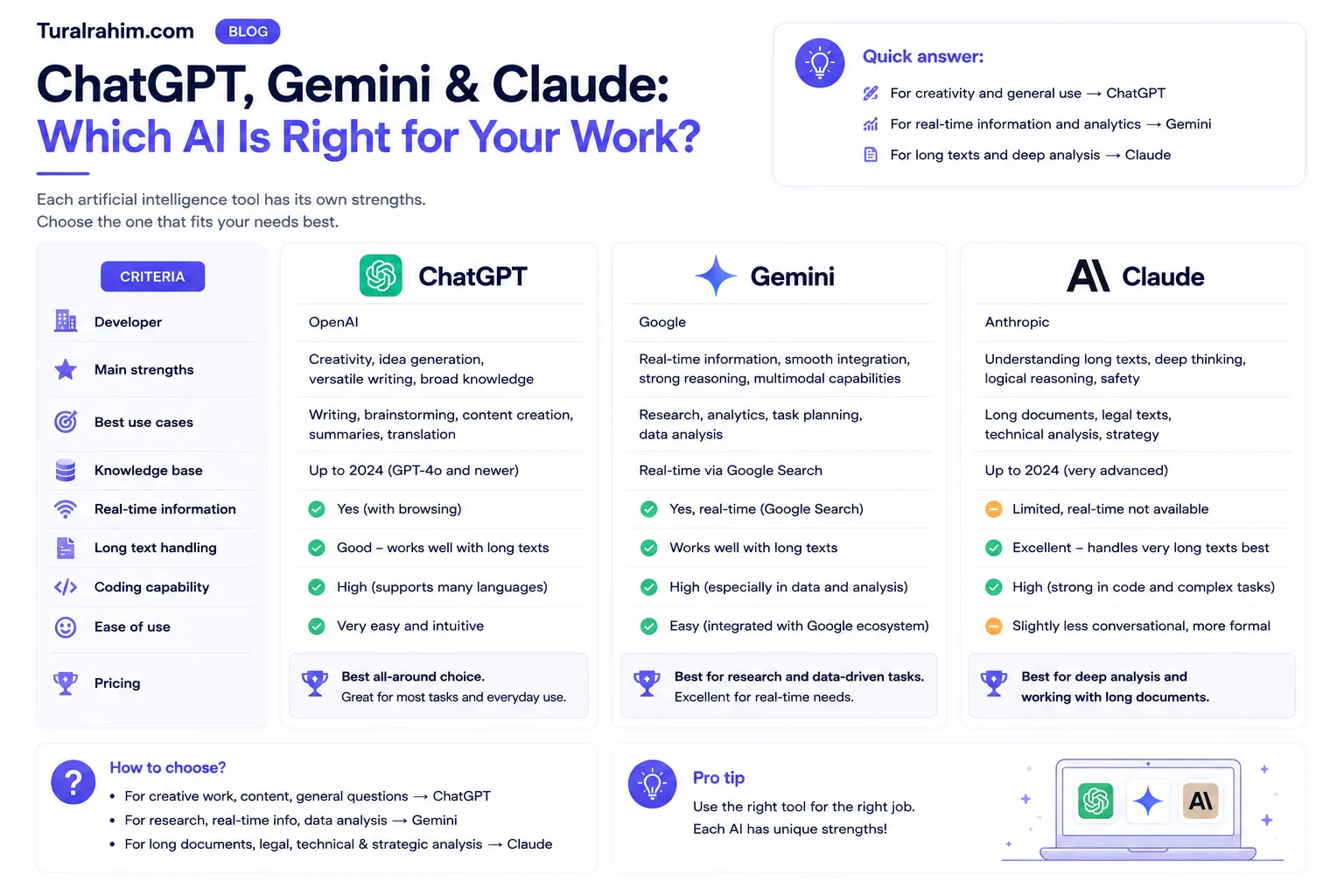
Here's the short answer: Three are powerful, and three have a free version. The choice depends on your case — Google tools (Gmail, Sheets, Docs) if you're working with Gemini, long documents and clutter-free writing if that's your thing Claude, for general routines and the most comfortable start ChatGPT.
But this answer is very general. Below, I compare all three in real case scenarios: what is strong, where is weak, how much money comes out, and — most important for Azerbaijani reader — which speaks our language better.
This post What is Artificial Intelligence (AI)? is part of its guide.
Note : Rates in this post to July 2026 applies and is for the US market. Prices in this area change a few times a year — check the company's own website before you pay.
⚡ Quick Answer: Which Should We Choose?
If you don't have time, read these three sentences instead of the table:
Select ChatGPT — if you are new to AI, do common things (text, ideas, images, translation) and want the greatest community support. Most tutoring material is there for this tool.
Select gemini — if your day is spent in Gmail, Google Docs, and Google Sheets. The difference is serious when the AI is directly in the document you're working on. Deep research is also powerful.
Select Claude — if you work with long documents (report, contract, research) and the quality of the writing is in the first place for you. The text reads more natural and less "robotic."
Here's the right way: try three for a week for free. A post can't decide on your behalf-your case is unique.
🟢 ChatGPT (OpenAI)
That's exactly the tool that introduced the world to AI. It came out at the end of 2022 and went all out in a few months. It is still the most used today.
Strengths
It does everything. Text, image, code, translation, voice-mail, file analysis — all in one place. Competitive as a "General Purpose" tool.
It's easiest to learn. On the Internet, there is a mountain of material about ChatGPT. It's easy to find the answer when you run into an issue.
Dedicated GPTs. You set it up once — for example, “assistant who writes social media text with my brand voice” — and then you run it ready every time.
Image creation in progress. You don't have to go to a private tool.
Weaknesses
The free version expires quickly. If you're working strictly, you'll see a “wait for the next message” screen in a few hours.
Sometimes it's too "polite". Text comes out as a template and sweet-it requires editing.
Longer documents are weaker than Claude. Analyzing a 100-page report isn't the strongest aspect.
Who's the right fit
Beginners, entrepreneurs, general office doers, students. If you don't know which one to choose, start here.
🔵 Gemini (Google)
Google's answer. The biggest advantage is not in the model itself, but where it's located.
Strengths
Google is drinking with the eco-system. Responds to mail in Gmail, edits document in Docs, builds formula in Sheets. Finish Copy-and-Paste — that's the biggest difference in practice.
Deep Research. You give a topic, it opens and reads hundreds of sites, and it builds a report showing the sources. It is powerful for competitor analysis and market research.
At Sheets
=AI()Service A thousand lines of customer feedback divides categories into one formula. For a marketer, it's a game-changer.Video creation ability is strong in paid plans.
Weaknesses
The best functions are paid. AI functions and video creation in Sheets are either missing or very limited in the free version.
Plans are confusing. AI Plus, AI Pro, AI Ultra, plus the two prices of Ultra — it's a job to figure out which ones.
Prices change frequently. Google's plans have changed several times in the past six months as we prepare this post.
Who's the right fit
Teams working with Google Workspace, those working with data, those doing research. If your company operates Gmail and Google Drive, the choice is clear.
🟠 Claude (Anthropic)
The least known of the three — and one of the most beloved among professionals.
Strengths
Writing quality. The text reads more natural, less “AI smelling.” You're taking a little time to edit.
Long documents. It can keep hundreds of pages "in sight" at once. Ideal for contracting, reporting, research.
Strong in analysis. It tends to show a weak spot in your plan, rather than agreeing with you. Answers honestly, “What's the weakest part of this idea?”
Low on annual fee — turns out to be advantageous to their opponents
Weaknesses
It doesn't create a picture. If it's a visual need, you'll need to switch to a different tool.
Eco-system integration is poor. Doesn't live in Gmail and Sheets.
There is little material in Azerbaijani. It's hard to find help when you run into an issue.
Too cautious at times — able to reject some requests unnecessarily.
Who's the right fit
Writers, lawyers, analysts, those who work with long documents. If the quality of the text is in the first place for you — Claude.
💰 Rates (2026, July)
All three has a working free version. I emphasize this separately because most of them know that AI is a must-have. The free version is all about learning and the bulk of the routine.
Paid plans are divided into three levels in practice:
Cheap check-in plan (about $5–10/month)
Go ChatGPT — $8/month. 10x more messages, files, and images than free.
Google AI Plus — this price changes frequently, updated several times in the last year. Current figure From Google's own page please check.
Claude — this level does not have a plan.
Basic professional plan (about $20/month) — that's what most people choose
ChatGPT Plus — $20/month. Powerful models, in-depth research, Projects, custom GPTs.
Google AI Pro — about $19.99/month. Gemini's Docs/Sheets/Gmail integration, increased limits, cloud storage.
Claude Pro — $20/month (at annual fee $17/month). Increased limits, unlimited projects, access to all models.
Please note: the three are about the same price. the choice should be determined by your work, not the price.
Power plans ($100–200/month)
ChatGPT Pro ($200/month), Claude Max (starting at $100/month), and Google AI Ultra ($100 or $200/month) -all are for day-long AI-enabled professionals. No ordinary user needed. First, hit the $20 limit, then think about it.
Golden Rule: Start with free. Pay when the limit hits-and only when it does. Subscribing to three tools all at once is the most common waste: $60 a month and you don't learn any better.
🇦🇿 So which is better in Azerbaijani?
You won't find the answer to this question online, so let's be honest.
All three write and read in English. But none are English level Cause tokenization issue: models were taught mainly in English text, and our pictures split our words into more pieces.
In practice, this is how you'll feel:
Simple things to do (letter, post, summary) — three are working normally, fluent in Azerbaijani.
In complex and long texts — sentences sometimes sound like translations, they come artificially.
In a local context — All three are weak and prone to fabrication about the Azerbaijani market, legislation, neighborhood details. Check.
Here's how it works: give the complex task in English, turn the result into Azerbaijani. You'll see the difference with your own eyes. Or write it like this: "Write the answer in Azerbaijani, but not as a translation — in living, natural language."
🎯 Your Work Option
Here's my recommendation for specific scenarios:
Marketer: Gemini (data analysis in Sheets + competitor research with Deep Research) + ChatGPT (content and visuals). The two complement each other.
Small business owner: ChatGPT. One tool, every job. Simplicity is valuable here.
Content Writer: Claude. A difference in the quality of writing manifests itself in everyday work.
Analyst / financial: Gemini (Sheets integration) or Claude (long reports).
Student Free versions. No payout needed.
If you work with a team: See what kind of eco-system the company is in. Google Workspace → Gemini.
Can I Use 🔄 All at Once?
Yes, and that's exactly what most professionals do — but with free versions.
Here's a practical approach: pay for one tool (the one you run the most), keep the remaining two for free. In an important case, it's very helpful to compare answers that ask the same question to two — if they both say the same thing, the answer is most likely correct; if they say it differently, it should be checked.
This method is the simplest protection against hallucination.
How to Try It 🧪 Yourself 3 Testing Methods
My recommendation doesn't know what you're doing. So the most important thing is to check it yourself. All you need to do is a week and three tests.
The condition is one of: give each of the three the same task, with the same words. If you type a different prompt, the comparison loses its meaning.
Test 1 — Your own text
Take a real work letter or post and tell all three: “Make it clearer, keep the tone." Then put the three answers side by side.
What you're looking at: your voice saved it? Which made it unrecognizable and turned it into a template text?
Test 2 — Your own ID
Upload your business document (report, suggestion, schedule) and ask the same question: “What's the weakest place here?”
What are you looking at: what document did they actually read and what common words did they cross? Which you dislike, but right said something that was?
Test 3 — Local context
Ask yourself a question about the Azerbaijani market to which you clearly know the answer. A detail in your field, for example.
What are you looking at: what “I don't know” did he manage to say, and what confidence did he invent? This test is most valuable because it shows where the tool can cheat you.
After three tests, you won't have any trouble deciding. And this decision will be worth more than the recommendation of me or another article, because checked on your work.
What else are 🔍 these three?
The market doesn't end with these three names. I'll briefly tell the others so you can see the full picture.
Microsoft Copilot — It resides in Word, Excel and Outlook. If your company is running Microsoft 365, Gemini's role on Google's side is played by Copilot. Behind them are predominantly OpenAI models.
Perplexity — not a chat tool, search tool. Provides a source link under each answer. It's invaluable for checking the fact quickly.
DeepSeek, Qwen and other open models — very cheap or free. But be more cautious about where information goes.
Grok (xai) — It has an integration with X (Twitter), making it interesting to follow social media trends.
Here's my advice: see you later. First, learn more about one of the top three. Tooling isn't about gaining skills.
Top 3 Mistakes to Make When Choosing a ❌ Tool
1. Assemble a tool
This is the most common mistake I find. A person signs up for five tools, asks each one of them a question or two, and doesn't dig deep in any of them. As a result, he has five "unfinished acquaintances" and not one skill.
Here's the reality: the man who knows a tool well and the man who knows five tools superficially is more productive than the man who knows the surface.
2. Expecting the “best”
“Let me wait a little longer and the better will come out” -that is, people have been waiting for two years. This area gets new every month; if you wait for the perfect moment, you'll never get started. The tool available today is already powerful enough for your present day job.
3. Expect magic from the tool
I often hear “I subscribed to ChatGPT, but the result is not good”. The answer is almost always the same: the problem is in the tool, not the given task. The most expensive plan will also poorly answer a weak question.
❓ Frequently Asked Questions
Which AI is the smartest?
The question isn't posed correctly. Three are about the same, and each month one passes the other. Today, choosing the “smartest” is an old decision three months later. The right question is: which one sits in my workflow?
Is the free version really enough?
Yes for the bulk of users. If you hit the limit too often and AI has become part of your business-then pay it off. Not in advance.
What's the real difference between the free and paid version?
Most people know that a paid plan gives you “smarter AI.” The main difference is usually within limits: how many messages can you write, how many files can you upload, how long can you work with the document. Next to this, paid plans open up access to powerful models and additional features (in-depth research, video, integrations). So you're not "mindful," basically volume and amenity You receive
Is it possible to pay from Azerbaijan?
It depends on your bank and card and varies from time to time — so I'm not writing anything definitive here. Check your payment methods from each company's own site.
Is my information secure?
Open AI tools don't upload private info — customer agreement, personal data, internal financial reporting. All three companies have the option to turn off the use of your conversations for teaching in their settings, but the safest rule is simple: before you download, ask, “What if this goes beyond that?”
Which one to choose for my team?
The key criteria for a team is not the strength of the model — is an eco-system. If the company is in Google Workspace, Gemini is in Microsoft 365, Copilot sits with the least resistance. Because the team doesn't like learning a new tool; it's used when AI appears in their already open window, and forgotten when they need to go to a separate site.
Which of these will stay a few years?
Honest answer: I don't know, and be skeptical of anyone who predicts it. But you shouldn't worry about that — the skill you learn is longer than the tool. If you've learned how to write a good prompt, the skill will stay with you no matter which tool wins tomorrow.
Will my work be lost if I change the tool?
Your chat history remains on that tool. But your prompts are universal-the good prompt that works on one instrument works on another, too. That's why keep your prompt library in a separate document, not in the tool.
Conclusion
The most important conclusion to be drawn from this comparison is: tool selection doesn't determine your outcome. Three is strong, and a weak prompt writer will do poorly in the most expensive plan.
So here's my recommendation: choose one, work strictly for a month, after try the other. Trying to learn three at once means learning none.
And don't be afraid to make a choice. It's not a marriage of a lifetime: if you change your mind a month later, it's five minutes to unsubscribe and switch to another. A real loss doesn't have to choose the wrong tool — because they can't decide, it's OK to never start.
Selected a tool? Now let's get to the real thing-the result is a tool, not a tool. question defines: What is Prompt? 3C Rules for Getting the Right Answer from AI

About the author
Tural Rəhimov
Digital Marketing Manager — UM Azerbaijan
Digital marketing manager at Universal McCann (UM Azerbaijan). Experienced in Google Ads, Meta Ads, TikTok Ads and media planning. I help brands grow online.
More about me →Need digital marketing support for your business?
Let's talk — I can help with everything from strategy to ad management.