Creating Content with AI: Image, Video, and Presentation
17 İyul 2026·👁 21 views
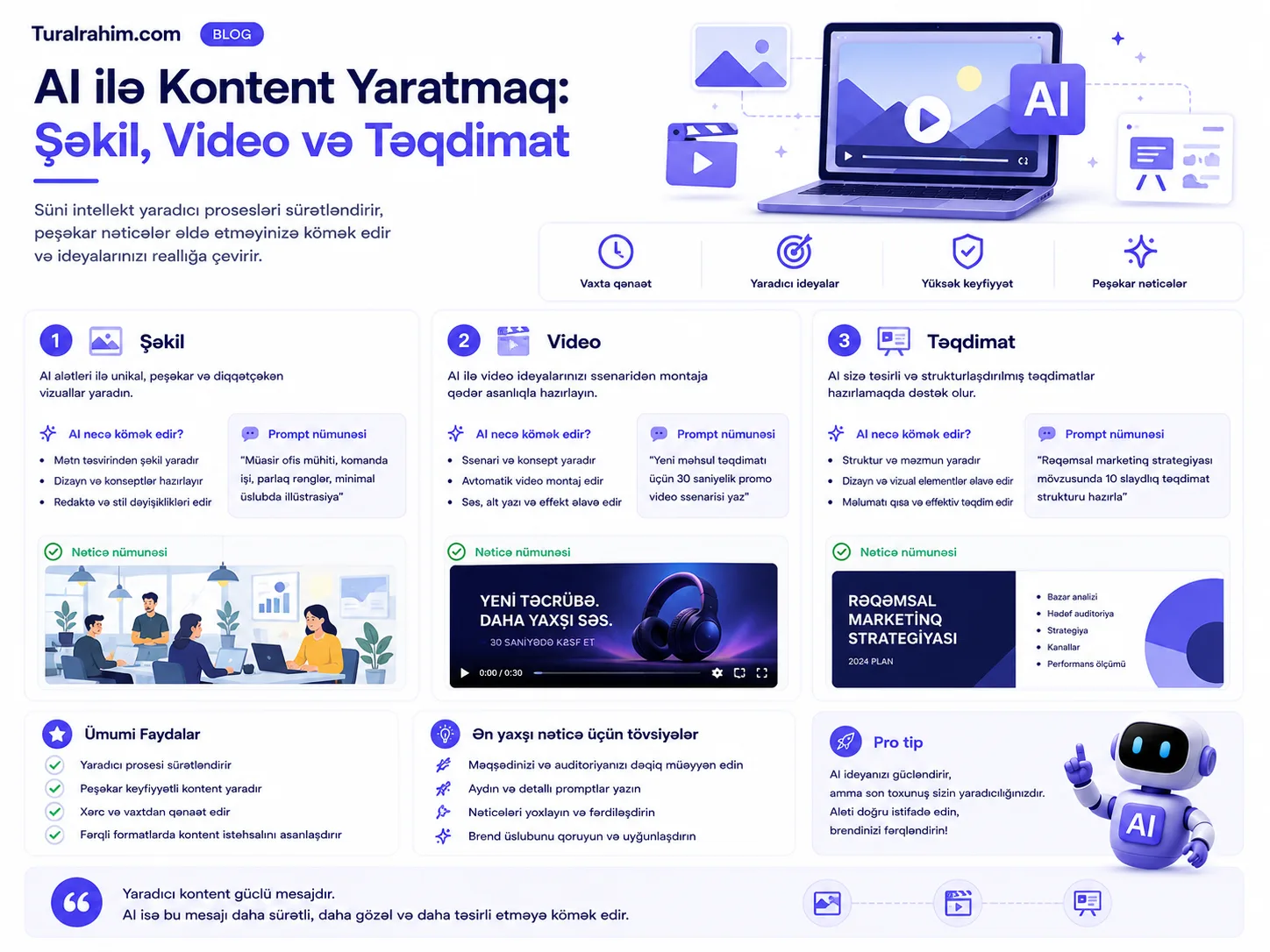
You're not a designer, you don't know how to make a video, making a presentation makes you nervous-but it's all part of your job. AI fills in this gap: text, you get a picture, you get a picture and you get a video, you turn a long document into a neat presentation in a matter of seconds.
That's it multimodal It's called a (multi-format) amenity — meaning you request one format (text) and get results in another format (image, video). In this article, I'll show all three — pictures, videos, presentations — with practical examples. Eventually, I'll draw an important boundary: where to operate what AI has created, and where not.
This post What is Artificial Intelligence (AI)? the application portion of its guide.
What Does 🎨 Multimodal Mean?
To be simple: AI no longer works only with text. you can provide one type of material and buy another type of material.
You get → a picture of yourself texting.
You get a → video.
You make a sound file and receive → written text.
You give a few pictures and get a new thing that connects to → them.
Here's what it means for you: it no longer takes an expert to convert your idea from one format to another. Marketing material, photos for the site, videos for the team, customer introductions — you can build it all on your own.
It's game-changing, especially for small businesses and single-employer professionals. Previously, you had to either pay for each visual work or wait for days. Now, the path from idea to outcome is measured in minutes — and lets you try harder, see more options.
Golden Rule: When you visualize AI, your role is not that of the “customer”, director it's about being. The more accurately you describe it, the closer the outcome is to your imagination. “Take a nice picture” doesn't mean anything.
Creating an Image with 🖼️ AI
That's the amenity you'll work hardest. But the result often doesn't turn out the way you'd expect it to — and the reason is almost always poor description.
In a second post i explained: the picture model starts from random "snow" and clears it until it matches your words. So the less you say, the more freely — and away from you — the model decides.
5 elements of a good photo prompt
OBJECT What should appear? No "cup of coffee" — Black coffee in a ceramic mug.
Style: Photography? Illustration? 3D? Minimalist? If you don't, the model chooses itself.
Light and mood: “Warm morning light,” “cold studio light,” “shadowy, dramatic.”
Cloud Background color, primary tones. Tell us if your brand has colors.
Format: Square (Instagram post), horizontal (site banner), vertical (story).
Before and after
Weak: “Take a photo for a furniture store.”
strong “A square picture of a bright living room. A simple, modern wooden magazine table inside. Warm morning light goes out the window. Colors: beige, white, light wood tone. Let the photo be a realistic style, a sense of depth. The room is neat, but not wet, not cold.”
You notice a difference, the second is not a sentence — direction of the director.
Improving step by step
Don't take your first picture as it is. like a chain Correct it
“Make the table a little bigger.”
“Make the light warmer.”
“The background is simple, there's a lot of stuff.”
This is how the model takes the previous picture and applies only the change.
Important warning: text and fingers
AI still picture at weak in texting — mixes letters. Don't take your logo or exact spelling to AI; add it later in the design program. Likewise, the human hand, fingers, and face may have imperfections — look carefully.
Giving reference pictures
One of the most powerful methods: give the AI an example of a picture you like and say, “Take it in style.” It's doubly accurate to show, rather than word by word.
For example, you took a picture of your most successful post last year and said, “Take this style, but this time it's winter.“ The model retains about colors, coverage, and composition. There is a condition: explain why the reference was given — "repeat colors" or "repeat composition"? The two give a different result.
Creating Video with 🎬 AI
This is the fastest growing industry. Today, you can take a picture and bring it to life, or even receive a short video from a text description.
Here's what the workflow typically looks like:
Step 1: First, you create an image (using the method above).
Step 2: You take that picture to the video tool and describe the action: “The camera is slowly approaching the table, the light is changing, and the curtain is shifting lightly behind it.”
When you write a description for the video, say three things: what moves, how the camera swings, how the mood feels.
Example: “A coffee mug is standing at the table. It goes up slowly. The camera starts from afar before slowly approaching the cup. Morning light, calm and warm mood.“ The more details you give, the closer the video comes to your imagination — because the gap that the model will anticipate is reduced.
But let's be honest — the AI video is still off-limits:
They're usually short (a few seconds).
In long, complex scenes, details break down.
The best features are often in paid plans.
That's why today's AI video short commercial, social media animation, product introduction suitable for — not for a full movie. But this area is changing quickly.
Convert 📊 Long Document to Present
This is perhaps the most time-consuming way in this article. Instead of making hours of slides, you turn long text into a neat presentation in a matter of seconds.
“Convert the document I added into an 8-slide presentation. Audience: potential customers. Have a short title and up to 3 items per slide. Set up a logical story between slides: a → problem-solving → outcome → challenge. Keep the language simple and don't use jargon.”
Then you can polish each slide separately: “There's a lot of text in slide 3, simplify” or “make captions stronger.”
Many tools also allow you to export your presentation, such as Google Slides or PowerPoint, which means you take the output and get on with your work.
You can also extract different presentations from the same document for different audiences. Once you say “technical introduction for the team,” then you ask that document for “sales presentation for the customer.” The content is the same, but the emphasis, language, and length are completely different-it would take hours to do manually.
🔍 Evaluating Visual Material
AI doesn't just create — criticism. This is a little known but very useful amenity.
You have a ready-to-watch, poster, or promotional image and you feel “something isn't right,” but you can't tell what's wrong. AI turns this into a promise — in two steps:
Step 1: “What design guidelines should be followed when making a flayer for a small business?”
Step 2: “Now, price the flayer I added according to those rules. Our goal is to get applications from small business owners. Show weak spots and suggest a specific fix.”
Step two is important: in the first step, AI establishes criteria. Unsecured pricing gives a useless “nice!” type of response.
Then, use AI to communicate this to the designer: “Write a quick, respectful note to send this review to the designer." Likewise, "something isn't right" feeling to a specific, functional task turns.
💡 “Show” idea — It's Difficult To Explain With Words
Sometimes you have an idea in your head, but you can't explain it in words. It's hard to tell a team, designer, or client, “I want something like this” -as everyone else imagines.
AI is a powerful tool here: you make the idea visible in a few minutes.
Here's a specific example: you have an idea about new product packaging. Before briefing the designer, you want them to draw 3-4 different options from the AI. You point to the designer and say, “I want something between these two.“ Now, everyone sees the same thing — and the designer's job is much easier.
This reveals a low-priced role of AI: it can be a tool for creating a finished product, but not for conveying an idea. AI drawn packaging may not be a realistic design-but it's perfect for starting a conversation.
Prototype: see before you spend money
The same logic applies to larger cases. Before investing in a new concept, you check with AI a few options for what it might “look like.” Didn't like it? No money, no time lost — you're just changing the prompt.
This is especially valuable for small businesses: you previously had to give money to a designer to test the idea, and now you can try ten ideas and only invest in one.
⚠️ Most Important Section: Where Not to Work?
Now let's dive into the serious part. Creating visuals with AI is easy-that's why it's also easy to do wrong.
Don't misrepresent the fact
If you're converting a report into an infographic, it looks like AI has flat out copied the numbers check. She can change or fabricate the number so that it "looks nice." The visual is convincing — the wrong number is more dangerous in a nice graphic.
Don't be fooled by people
It's technically easy to create a “customer picture,” a “before-the-ground” photo, or a fake review visa that looks realistic with AI — but that's deception. The customer learns this one day and the trust is permanently lost. The most valuable thing in marketing is trust; don't risk it for a picture.
Focus on copyright
Images that mimic real brands' logos, recognizable characters, or a specific artist's style can cause legal trouble. Create your own original visuals.
Brand compliance
Not every picture of AI fits your brand. Color, style, mood-all match your brand manual. Beautiful, but alien to your brand, weakening your brand.
Golden Rule: If you're submitting something as fact (number, before, customer experience), double check that the AI is displaying it correctly. Be free to visualize creatively; careful in visualizing a claim to truth.
Change 🖌️ Existing Image
AI doesn't just create from scratch — it also edits the image in your hand. It's also often helpful to create from scratch because you're working with real material.
What you can do:
Deleting an excess item: There's an item in the background of your product photo that says, “Delete glass behind this picture.”
Changing the background: "Move product to white background" — invaluable for e-commerce.
Expand: The image is square, you need horizontal — AI is able to 'continue' the edges logically.
Changing the style: “Make this picture a warmer, greener tone.”
This way you can update your old product images, subtract multiple formats from one image — without having to re-arrange each time.
But there's a boundary
Don't change the picture of a real product so that it doesn't match when the customer buys it. Turning color into an unrealistic tone, exaggerating size, hiding a defect, these things deceive the customer. Editing should be for beautification, not lying.
🚀 Practical Workflow
Let's connect you all. Let's say you're developing a social media campaign for a new service:
1. Ask AI for 3 visual concepts (not a picture yet, but an idea).
2. Select one and create a detailed picture.
3. Please fix the photo step by step until you like it.
4. Get a quick video/animation from that picture.
5. Evaluate the outcome with your own eyes (or given customer role to AI).
6. Add the logo and exact text yourself at the end.
A few years ago, it would have taken a designer, an installer, a week. Now it takes one person, a day. This doesn't mean that the designer is unnecessary — it's just that the designer's time is no longer focused on the template work, but on the work that really requires creativity.
❓ Frequently Asked Questions
Are AI photos free?
The cover image creation is in the free version in most tools, but limited (a certain number per day). Video and high quality usually pay off. What tool does in comparison i wrote.
Can I work on a commercial AI shot?
Most tools allow this, but terms change from tool to tool and are updated periodically. Read the terms and conditions of the tool you use for serious commercial work once-this is five minutes of insurance to avoid problems later on.
Why do typos go wrong?
Because it "draws" pattern letters, it doesn't read — it draws unfamiliar. Therefore, do not rely on the exact text in the image (logo, slogan, price); add it later.
Which tool is best for the picture?
This changes frequently, and each tool passes each other. The best way: try a few with the same prompt and compare the result. Today, Gemini (Google) is a strong choice for video.
Does it really take time to prepare the presentation with AI?
Yes, but set your expectations straight. AI gives you 90% skeleton ready gives — structure, headings, items, logical flow. The remaining 10% — checking the exact numbers, matching the brand, final polishing — is your job and the most important part. That means you skip the “build from scratch” phase, starting directly from “polish”. A day's work takes an hour, but not to zero.
The picture comes out different every time, I can't keep it steady. What do I do?
This is the nature of the model — she works every time with a little coincidence. There are two solutions: save the picture you like immediately (the same will not come up again) and, if you want to continue with the same style, retrieve that picture as a reference. Some tools also have a setting called "seed" (seed), which makes the result repeatable.
Will AI take away the work of the designer?
No — but it changes the role of the designer. Simple, repetitive work (social media template, simple banner) will be done more by itself. With complex branding, strategy, and taste, the need for a designer will grow. AI becomes a tool for the designer, not a competitor.
Conclusion
AI has made visual creation accessible to everyone — but that doesn't mean it's all good visual creation. The difference is still in your eyes and in your taste.
AI gave you the brush. And you're still taking the picture-it's you who decides what's great, what's relevant to your brand, and what's honest.
Try something this week: create a picture for a social media post from scratch with AI. Start with a weak prompt — for example “product picture” — then adjust it step by step as a director: style, light, color, composition. The difference between the first result and the last will teach you everything in this article at once. Because it convinces you to see rather than read in the visual work.
Next step — working with numbers: Data Analysis with AI: Artificial Intelligence in Google Sheets
About the author
Tural Rəhimov
Digital Marketing Manager — UM Azerbaijan
Digital marketing manager at Universal McCann (UM Azerbaijan). Experienced in Google Ads, Meta Ads, TikTok Ads and media planning. I help brands grow online.
More about me →Need digital marketing support for your business?
Let's talk — I can help with everything from strategy to ad management.