Prompt Examples: Templates Ready for Work and Marketing
17 İyul 2026·👁 11 views
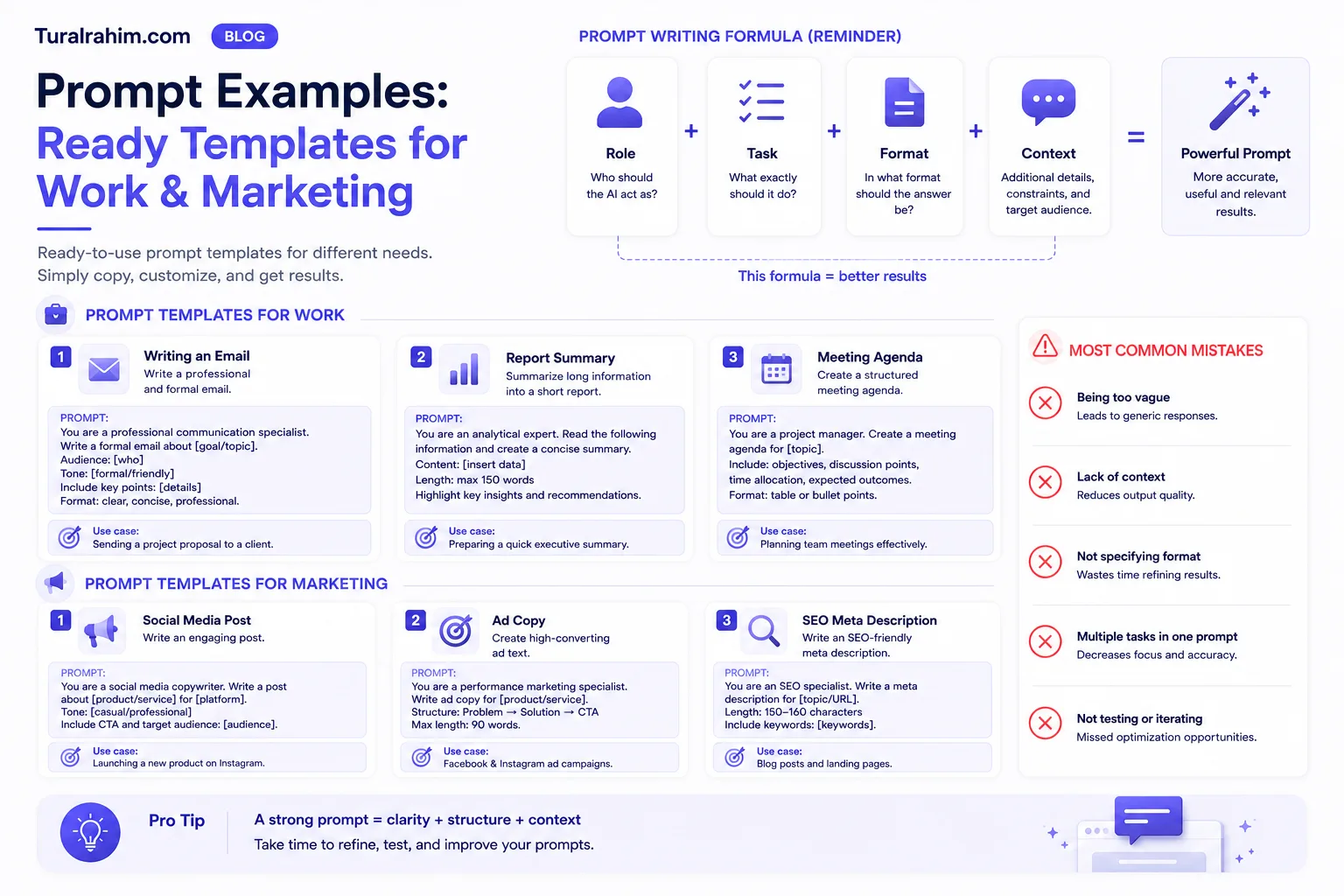
In this post prompt templates you can copy and use right away there — for case correspondence, data analysis, content, research and decision-making. Each template contains square brackets: [such]. Replace them with your details and the rest will be as it should be.
But a warning: pasting the template blindly doesn't work. The template skeleton — it's your context that gives him the meat. I'll also show you how to do it below.
If you want to understand why templates are built the way they are, read here first: What is Prompt? Rule 3C. For a general view: What is Artificial Intelligence (AI)?
How to Make 📋 These Templates Work?
Three simple rules:
Fill the brackets. Replace "[your area]" with "furniture sale". If you send from the refill, the AI will estimate the bracket itself — and will often guess incorrectly.
Add context. Because the template is universal, it doesn't recognize your business. Add a sentence or two to the end: who's your customer, what didn't work last time, what's your limitation.
Don't count out the last answer. Template chat started, does not finish.
Golden Rule: No matter how good the template is, it will give everyone the same response without your context. It's not a template that sets you apart from your opponent — here's what you've added to the template.
✍️ Writing and Communication Templates
1. Turning meeting notes into worksheets
“You're an experienced project manager. Make a report based on the meeting notes I've added. Have these sections in the report: decisions made, tasks to be carried out (who, what, when), open-ended questions. Give tasks as items instead of tables.”
When you worked: After a long meeting, not everyone has forgotten what they agreed to.
2. Writing the same news to different people
“The document I attached is about [name of the project]. I need to communicate this news to two people: [first person and its priority, for example: finance director — interested in budget and revenue] and [second person and its priority]. Think about what they'll both focus on first, then write a separate brief for each.”
Why it works: AI first thinkyou're instructed to write, and if you directly "write a letter," they'll both give you the same text.
3. Responding to a difficult letter
“I received a letter from a dissatisfied customer: [paste letter]. Here's the situation: [what happened, who's at fault, what you can offer]. Write me 2 different answers: one more formal and one more friendly. Both hold me accountable and offer a concrete solution, but don't take the legal obligation.”
Fard Be sure to read it yourself and change it if necessary before sending such an email. The final word in relationship conversations is always human — AI can capture the tone, but only you know your history with that customer.
4. Criticizing your own text
“You are my potential client: [client portrait — age, situation, concern]. Read the following text and tell me: in what part did you lose interest, what did you not understand, what did you not believe? Please don't write kind words, only show problems. Text: [text]"
This template is the most valuable on this list. Texting is easy-it's hard to see where to try.
📊 Data and Analysis Templates
5. What metrics should I look for?
“I work in [your field]. [Why are you preparing — ex: management quarterly report]. Our main goal is [purpose], and my leadership is most interested in [what we're interested in]. What 5 metrics should I focus on in the report and why?”
6. What questions will management ask?
“You're the [role — ex: budget-sensitive finance director]. Read the report I attached. With your eyes: what information is missing here and what would be the 5 most difficult questions to ask me during the presentation?”
When you worked: The day before the important presentation. It's cheaper to hear your weak spots from AI rather than your supervisor.
7. Divide mixed reviews into categories
“Below are customer reviews. Only apply each to one of these categories: [price / quality / delivery / service / other]. Next, count how many reviews there are in the category and list the 3 most frequently repeated issues. Reviews: [paste reviews]"
Important item: Categories you you give. If you say "divide by categories," the AI will fabricate its own and you won't be able to compare the result.
8. Finding the story behind the number
“You're a data analyst. [My business] came up with this: [specific finding — for example: mobile users' conversion is 3 times lower than desktop]. List 5 possible reasons, starting with the most likely one. Let me know how I can check it for every reason.”
🎨 Content and Marketing Templates
9. Getting a visual idea
“I want to make [what you need — for example: an image for social media]. We offer [what you sell] to [whom]. Give me 3 different ideas: one that is completely simple and logical, one that is average, and one that is bold and unusual. Taking still pictures-let's discuss ideas first.”
trick The "pull still" sentence is essential. Without it, AI will immediately take pictures, and you'll agree to what you saw first.
10. Create a picture
“I loved the idea of [the idea you chose]. Create a picture of: [style — ex: minimalist, warm tones], background [color], mood [ex: professional but friendly]. Please include [text] in the image.”
11. Turning a long document into a submission
“Convert the document I added to [how many] slideshow presentations. Audience: [who]. Have a short title and up to 3 items per slide. Set up a logical story between slides: → problem-solving → conclusion.”
12. Evaluate the design
This is a two-step template — and that's why it works:
Step 1: “[What kind of material — ex: flayer] what kind of design guidelines [for which area] should be followed?”
Step 2: “Now, the [material] I've added is priced according to those rules. Our goal is [what it is]. Show weak spots and suggest a specific fix.”
Why two steps? Because in the first step, AI establishes a criterion. Critical pricing gives a useless “nice, good luck!” type of response.
13. Monthly plan for social media
“I manage a [platform] account for [your business]. Our audience is [who]. Make a monthly content plan: [how many] posts per week. Divide posts into 3 types: useful information, business background, sales. Save the ratio for 60/30/10. Write only a topic and a brief idea for each post-I 'll write it myself later.”
Warning The last sentence is important, or you'll write 30 post texts and drown in them.
14. Structure for blog post
“I'm creating a blog post on '[Keyword]'. My reader [who and what they're looking for]. Build me a header structure: H2 and H3 level. Show what to write in one sentence under each heading. Texting — only a skeleton is needed.”
Let's See 📌 a Template in a Real Example
Let me show you the difference between the empty and full state of the template — because the whole meaning of this post is right here.
Blank template (number 4):
“You're my potential client: [client portrait]. Read the following text and tell me: in what part did you lose interest, what did you not understand, what did you not believe?”
In this case, the AI will imagine a common person and give a common response: “the text is clear, it can be shortened a bit.”
Filled template:
“You are a potential client of mine: a 38-year-old family man who is buying and renovating a new apartment in Baku. Low time, you're looking at the phone at 11pm. The budget for furniture is 4,000 manats, and you've already spent most of it on maintenance. You've ordered from a store before, the size went wrong and took two months to make. Now, if someone says' quality ', you won't believe it.
Read the following text and tell me: in what sentence did you lose interest, what did you not believe, what question was left unanswered? Kind words. Text: [text]"
In the second case, the answer will be entirely different. Here's what AI will tell you: “I lost interest in 'quality furniture' — that's what everybody writes. You didn't say anything about the size guarantee, but that's my biggest fear. There's no word on price, so it's going to be expensive.”
See the difference? Same template, same tool. It's only context that changes — and you only have that context.
🔍 Research Templates
15. Competitor analysis
“We operate in [the area] in the [city/market] market. Our main opponents: [names]. Examine their positioning, strengths and weaknesses. Only use recent [period] data. In conclusion: what are the empty spaces we can occupy?”
Condition Run this in internet-accessible mode (Deep Research or search mode). AI in Ordinary Mode rivals fabricate.
16. Learning from scratch
“I don't know anything about [the topic], but I need to learn [why]. Explain to me: first, a common sight in 5 sentences, then 5 key concepts I need to know, and lastly, 3 most common mistakes by beginners. If you use the term, explain it immediately in plain language.”
🧠 Thinking and Decision Templates
17. The Devil's Advocate
“I've got a plan: [your plan]. Become a devil's advocate. List 5 scenarios where this plan will fail, starting with the most likely one. Deal with me — find the weakest point.”
18. Comparing ideas
“I'm looking at these options: [1, 2, 3]. Write down the cost (low/medium/high), expected benefit (low/medium/high), and underlying risk for each. Then: which one do you recommend starting with a limited budget and why?”
19. Finding the missing step in the plan
“You're an experienced project manager. Here's my plan for [what you're doing]: [plan]. Are there dependencies and steps I didn't take into account in this plan? Focus especially on places that depend on other teams.”
20. Creating Your Own Expert
Step 1: “What are the key attributes, mindset and principles for [expert role — ex: experienced SEO professional]?”
Step 2: "You're [that role]. Features: [Paste the answer to step 1]. I [your role]. Survey my ideas and show my weaknesses. Be clear, honest, and specific about advice. Stay in the role throughout the conversation.”
Keep this second text — you'll work every time you consult an expert.
🧩 Merge Templates
True power is not in a single template, in sequential orderdir. Real work doesn't end in a prompt.
For example, you're advertising for a new service. Instead of saying “write an ad” with a prompt, arrange the templates as a chain:
Step 1 — Template 16: study the topic, understand how opponents talk.
Step 2 — 9th template: Get 3 different ideas, choose one.
Step 3 — write the text (with your chosen idea + context).
Step 4 — Template 4: criticize the finished text through the eyes of your own client.
Step 5 — fix critically.
Please note: the output of each step becomes the input of the next step. They're all in the same conversation, so the AI doesn't lose context.
The result will be more than double what you would get from a single prompt — because you don't have to do a single task to AI, workflow you've given it the name of the method is prompt chaining, and I dedicated a separate post to it: What is Prompt Chaining?
🚫 "Templates" not working
Some prompts browsing online seem to be effective, but they're empty. Know:
“You're the best marketer in the world.” — "Best" doesn't mean anything. The model can't measure that. Write a specific experience instead: “a marketer who works for local businesses on a small budget.”
“Write a strategy that will earn me $10,000.” — The number does nothing to the model, it just makes you want to write ambitious text.
“Think deeply and respond perfectly.” — "Perfect" doesn't measure up. "Step by step" works because it shows the process.
500-word “magic” prompts. — Length is not quality, many of them are adjectives that replicate each other.
How to 🛠️ Build Your Own Template
Templates in this list are initialized. True power in your own templatesbecause they know your business.
Set up like this:
1. Choose something you repeat 2-3 times a week.
2. Write it down well once: role, task, format, context.
3. Fix until the result is good — usually 3-4 attempts.
4. Move working version to document, changing locations [bracket] strand.
5. Next time, don't write from scratch — open the template.
After six months, you'll have 15-20 templates on hand. It's your personal set of tools — and no competitor can copy it because you have experience in it.
❓ Frequently Asked Questions
Are the ready-to-ship prompt packs worth buying?
Not usually. The bulk of prompts sold are a decorated form of the principles in this article. Plus, they don't know your business-which means you already have to add the base value. It's even more beneficial to buy a monthly subscription for that money and train yourself.
Can I use the template on every tool?
Yes. These templates ChatGPT, Gemini and Claudein works the same because they are all based on the same principle. The only exception: templates that require internet (competitor analysis) require the appropriate mode.
I sent the template, and the AI repeated the brackets in the response as they should be. Why?
Because you didn't fill the bracket, the AI either predicts or retains the “[your field].” Before sending the template, take a moment to review the text-if there are brackets left, something isn't filled in.
I wrote the template in Azerbaijani, but the answer is artificial. What do I do?
Add this sentence to the end: “Write the answer in natural, living Azerbaijani — it doesn't sound like a translation.“ If it doesn't help, give the assignment in English and turn it around.
How many templates do you need?
Little, but good. A person who works 5 templates every day is productive, a person who keeps 50 templates in a folder.
Can I use the template's response exactly?
No — and this is the most repeated mistake. Template response draft. Check if it's factual, correct if the tone doesn't match your brand, add a detail from your experience. The text of the person who publishes the AI as it was written will look similar to the text of his opponent — because they both came from the same model. How the model works if you know why, it's clear: he gives the most likely answer, not the most original one.
Conclusion
Don't try to run all of these templates in one day. Choose one — for example, the "critiquing your own text" template number 4 — and use it three times this week.
Turning a template into a habit is valuable if you keep your twenties in a folder.
Bookmark this post, but don't dwell on it: grab a template this week and adjust it to your own work and add your context. That's how it went from being my template to your template turn around — that's where the difference is.
But big tasks that a prompt doesn't fit into? They have a separate method: What is Prompt Chaining? Tackling Complex Tasks Step-by-Step

About the author
Tural Rəhimov
Digital Marketing Manager — UM Azerbaijan
Digital marketing manager at Universal McCann (UM Azerbaijan). Experienced in Google Ads, Meta Ads, TikTok Ads and media planning. I help brands grow online.
More about me →Need digital marketing support for your business?
Let's talk — I can help with everything from strategy to ad management.